
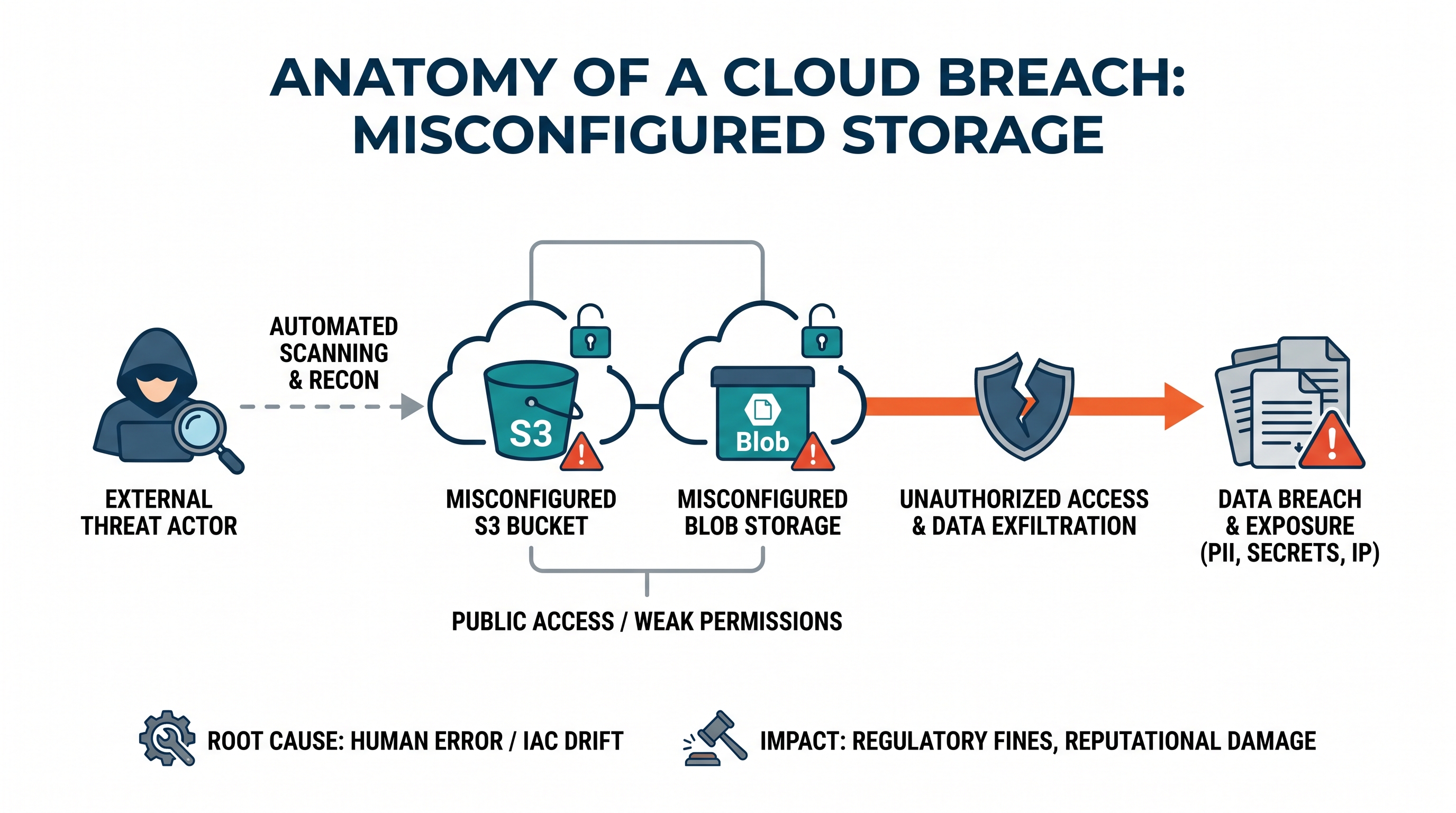
The Persistence of the Open Bucket Problem
In the early days of public cloud adoption, securing object storage was often an afterthought. AWS Simple Storage Service (S3) buckets and Azure Blob Storage containers were frequently deployed with default configurations that favored ease of access over strict security boundaries. Fast forward to today: despite cloud service providers (CSPs) implementing "secure-by-default" flags, object storage leaks continue to dominate cybersecurity headlines.
Why does this vulnerability persist? The answer lies in the growing complexity of modern enterprise cloud environments. As organizations adopt multi-cloud architectures across AWS, Azure, GCP, and OCI, they inherit a fragmented identity and access management (IAM) landscape. Security teams must manage a web of IAM policies, bucket policies, Access Control Lists (ACLs), Shared Access Signatures (SAS), and network-level security rules. A single oversight by an engineer attempting to resolve an integration blocker can expose terabytes of sensitive enterprise data to the public internet.
This article provides a comprehensive architectural breakdown of how these misconfigurations occur, how attackers systematically scan and exploit them, the devastating financial impact of unauthorized data egress, and how to build a resilient defense-in-depth security model using unified cloud security management strategies.
Anatomy of AWS S3 Misconfigurations
To understand how an S3 bucket becomes exposed, we must analyze the evaluation logic of AWS S3 access control. S3 access is governed by the intersection of three distinct authorization mechanisms: IAM Policies, S3 Bucket Policies, and S3 Access Control Lists (ACLs). If any one of these is misconfigured and the S3 Block Public Access (BPA) feature is disabled, the bucket can become globally accessible.
The Conflict Between ACLs and Bucket Policies
Historically, S3 ACLs were the original method for managing bucket and object access. While AWS now recommends disabling ACLs in favor of Bucket Policies (using the "Bucket Owner Enforced" setting), legacy systems and poorly written Infrastructure as Code templates still enable them.
Consider a scenario where a developer wants to share a specific asset with an external partner. They apply an ACL to an object or the bucket itself, granting read access to the "All Users" group (represented by the canonical URI http://acs.amazonaws.com/groups/global/AllUsers). Even if the bucket policy does not explicitly allow public access, this ACL override opens the resource to the entire internet.
Anatomy of a Vulnerable Bucket Policy
A more common vector is an overly permissive S3 Bucket Policy. Bucket policies are resource-based policies written in JSON. A single wildcard character in the wrong element can completely bypass authentication requirements. Below is an example of a dangerously misconfigured bucket policy:
{
    "Version": "2012-10-17",
    "Statement": [
        {
            "Sid": "AllowPublicReadForAssets",
            "Effect": "Allow",
            "Principal": "*",
            "Action": [
                "s3:GetObject",
                "s3:ListBucket"
            ],
            "Resource": [
                "arn:aws:s3:::enterprise-data-lake",
                "arn:aws:s3:::enterprise-data-lake/*"
            ]
        }
    ]
}
In this policy, the "Principal": "*" combined with the actions s3:GetObject and s3:ListBucket allows any unauthenticated user on the internet to not only download every file in the bucket but also list the entire contents of the directory. This exposure is magnified if the bucket contains database backups, PII, or proprietary source code.
The Fallacy of "Authenticated Users Only"
For years, developers mistakenly believed that selecting the "Any Authenticated AWS User" group limited access to users within their own AWS Organization. In reality, "Any Authenticated AWS User" refers to any person with a valid AWS account globally—including adversaries. An attacker can spin up a free-tier AWS account, authenticate via the AWS CLI, and legally access resources configured with this group permission.
Anatomy of Azure Blob Storage Misconfigurations
Azure Blob Storage uses a different authorization paradigm, yet it is equally susceptible to misconfiguration. Access to Azure storage accounts can be configured via Azure Active Directory (Azure AD/Entra ID) RBAC, Shared Access Signatures (SAS), Storage Account Access Keys, or Public Access Levels.
Public Access Levels: Blob vs. Container
When creating a container in an Azure Storage Account, developers are presented with three public access levels:
Private (no anonymous access): Only authorized Azure AD principals or those with valid SAS tokens/keys can access the data.
Blob (anonymous read access for blobs only): Anyone can read specific blobs if they know the exact URL, but they cannot list the contents of the container.
Container (anonymous read and list access for containers and blobs): Anyone can list all blobs in the container and download them without authentication.
If an administrator sets the storage account's "Allow Blob public access" property to true, individual container administrators can inadvertently set the access level to "Container," exposing the entire directory structure to public indexers.
The Danger of SAS Token Mismanagement
Shared Access Signatures (SAS) provide delegated access to resources in your storage account with specified permissions and lifetimes. However, they are frequently abused. Common anti-patterns include:
Generating infinite-lifetime SAS tokens: Hardcoding SAS tokens with expiration dates set years into the future within client-side applications.
Over-privileged SAS tokens: Generating tokens with Read, Write, List, and Delete permissions when only Read access was required.
IP Whitelist omission: Failing to restrict SAS token usage to specific corporate egress IP ranges.
Once a SAS token is leaked (for example, via a public GitHub repository or intercepted HTTP traffic), an attacker has full access to the storage account within the bounds of that token's permissions, completely bypassing Azure AD authentication.
The Attack Path: How Adversaries Find and Exploit Exposed Storage
Modern cybercriminals do not stumble upon open cloud storage buckets by accident. They employ highly automated, industrialized scanning pipelines designed to detect, validate, and exfiltrate data from exposed endpoints within minutes of their creation.
Phase 1: Reconnaissance and Target Generation
Attackers use passive and active reconnaissance techniques to build target lists. These include:
DNS Enumeration: Subdomain brute-forcing tools (such as
subfinderoramass) are configured with wordlists containing common corporate naming conventions (e.g.,company-prod-backups.s3.amazonaws.comorcompanybilling.blob.core.windows.net).Certificate Transparency (CT) Logs: Monitoring public CT logs in real-time to extract newly registered subdomains that reference storage endpoints.
Public Search Engines: Leveraging specialized search engines like Shodan, Censys, and GrayhatWarfare, which continuously crawl the internet indexing open S3 buckets and Azure containers.
Phase 2: Automated Validation
Once a potential bucket or container endpoint is identified, automated scripts query the cloud provider API to test for anonymous access. For AWS S3, a simple HTTP GET request to the bucket URL returns specific XML payloads indicating status:
403 Forbidden: The bucket is private (though the name exists).404 Not Found: The bucket name is available or does not exist.200 OK: The bucket is public and its contents are listable.
Phase 3: Exfiltration and Ransomware (Double Extortion)
If write permissions are enabled alongside read permissions, the attack path escalates dramatically. Attackers will:
Download the existing files (data exfiltration).
Encrypt the files locally and upload the encrypted versions back to the bucket.
Delete the original unencrypted files.
Leave a ransom note in the bucket (e.g.,
README_FOR_DECRYPTION.txt) demanding payment in cryptocurrency.
To prevent these sophisticated attack paths, security teams must deploy robust, real-time threat detection and CISO security solutions that continuously audit resource states.
The FinOps Connection: The Hidden Costs of Open Storage
While data breaches represent a catastrophic compliance and reputational risk, misconfigured cloud storage also introduces massive, unexpected financial liabilities. This is where cloud security directly intersects with Cloud Financial Operations (FinOps).
Data Egress Fee Exploitation
Public cloud providers charge nominal fees for storing data, but they charge significant premiums for outbound data transfer (egress) to the public internet. If an attacker discovers an open S3 bucket containing a 100 GB database backup and downloads it repeatedly, the hosting organization is billed for every gigabyte transferred.
Consider the following scenario: An enterprise hosts a 1 TB dataset in an AWS S3 bucket in the us-east-1 region. The bucket is misconfigured as public. An attacker writes a multithreaded script to download this dataset 50 times over a weekend.
The calculation of the data egress cost is as follows:
Total Data Transferred: 1 TB x 50 = 50 TB
AWS Egress Pricing (approx. $0.09 per GB after the first free GB):
50,000 GB x $0.09 = $4,500.00
This "Denial of Wallet" attack can scale rapidly into tens of thousands of dollars before standard billing alerts trigger, highlighting the critical need for a unified cloud financial operations platform that correlates security anomalies with real-time spend spikes.
API Request Flooding
Even if an attacker cannot read the data due to client-side encryption, they can still flood an open bucket with millions of GET or LIST requests. AWS charges for these API calls (e.g., $0.0004 per 1,000 GET requests). While this sounds negligible, a distributed botnet executing billions of requests against an open bucket can inflate an organization's monthly cloud bill by thousands of dollars in a matter of hours.
Remediation and Prevention: Hardening IaC Configurations
Securing object storage requires moving away from reactive manual console fixes and moving toward declarative, automated guardrails. Below are production-ready Terraform configurations designed to enforce maximum security for both AWS S3 and Azure Blob Storage.
Secure AWS S3 Bucket Terraform Configuration
The following Terraform code deploys an S3 bucket with public access explicitly blocked, default KMS encryption enabled, versioning turned on, and access logging configured.
resource "aws_kms_key" "s3_encryption_key" {
  description             = "KMS key for encrypting S3 bucket contents"
  deletion_window_in_days = 30
  enable_key_rotation     = true
}

resource "aws_s3_bucket" "secure_bucket" {
  bucket        = "enterprise-secure-data-lake"
  force_destroy = false

  tags = {
    Environment = "Production"
    ManagedBy   = "Terraform"
    DataClass   = "Confidential"
  }
}

resource "aws_s3_bucket_server_side_encryption_configuration" "secure_bucket_sse" {
  bucket = aws_s3_bucket.secure_bucket.id

  rule {
    apply_server_side_encryption_by_default {
      kms_master_key_id = aws_kms_key.s3_encryption_key.arn
      sse_algorithm     = "aws:kms"
    }
  }
}

resource "aws_s3_bucket_versioning" "secure_bucket_versioning" {
  bucket = aws_s3_bucket.secure_bucket.id
  versioning_configuration {
    status = "Enabled"
  }
}

# Enforce Block Public Access (BPA) at the bucket level
resource "aws_s3_bucket_public_access_block" "secure_bucket_bpa" {
  bucket = aws_s3_bucket.secure_bucket.id

  block_public_acls       = true
  block_public_policy     = true
  ignore_public_acls      = true
  restrict_public_buckets = true
}

# Enforce TLS 1.2 or higher for all transit operations
resource "aws_s3_bucket_policy" "enforce_tls" {
  bucket = aws_s3_bucket.secure_bucket.id

  policy = jsonencode({
    Version = "2012-10-17"
    Statement = [
      {
        Sid       = "EnforceTLSRequestsOnly"
        Effect    = "Deny"
        Principal = "*"
        Action    = "s3:*"
        Resource = [
          aws_s3_bucket.secure_bucket.arn,
          "${aws_s3_bucket.secure_bucket.arn}/*"
        ]
        Condition = {
          Bool = {
            "aws:SecureTransport" = "false"
          }
        }
      }
    ]
  })
}
Secure Azure Storage Account Terraform Configuration
This Terraform configuration ensures that an Azure Storage Account disables anonymous public access entirely, enforces HTTPS, restricts inbound traffic to designated virtual networks, and utilizes customer-managed keys.
resource "azurerm_storage_account" "secure_storage" {
  name                     = "enterprisesecurestore"
  resource_group_name      = var.resource_group_name
  location                 = var.location
  account_tier             = "Standard"
  account_replication_type = "ZRS" # Zone-Redundant Storage for high availability

  # Prevent anonymous public access to any blob or container within the account
  allow_nested_items_to_be_public = false

  # Enforce TLS 1.2 minimum
  min_tls_version = "TLS1_2"

  # Enforce secure transfer (HTTPS)
  enable_https_traffic_only = true

  network_rules {
    default_action             = "Deny"
    bypass                     = ["AzureServices"]
    virtual_network_subnet_ids = [var.private_subnet_id]
    ip_rules                   = ["203.0.113.0/24"] # Restrict to corporate egress IP range
  }

  tags = {
    Environment = "Production"
    Compliance  = "HIPAA-PCI"
  }
}
Preventing Configuration Drift with Policy-as-Code
While deploying secure Infrastructure as Code is a critical first step, it does not prevent manual "hotfixes" applied directly in the cloud console by well-meaning engineers troubleshooting live incidents. This discrepancy is known as configuration drift.
To combat drift, organizations must implement continuous policy enforcement. This can be achieved through:
AWS Service Control Policies (SCPs): Organizations can apply SCPs at the root or OU level to globally deny the ability to disable Block Public Access or delete S3 access logs.
Azure Policy: Custom Azure Policy definitions can automatically audit and remediate storage accounts where
allowBlobPublicAccessis set to true.Automated Guardrails: Deploying real-time scan engines that immediately detect policy violations and execute self-healing workflows (e.g., automatically applying a public access block if a bucket is modified to be public).
By leveraging automated security guardrails, enterprises can ensure that security compliance is maintained continuously, rather than during point-in-time audits.
The CloudAtler Approach: Unifying Cloud Security, FinOps, and Operations
The traditional approach to managing cloud infrastructure involves siloed tools: a Cloud Security Posture Management (CSPM) tool for security, a separate FinOps tool for cost optimization, and an APM tool for operations. This fragmentation results in alert fatigue, blind spots, and delayed incident response times.
CloudAtler redefines this paradigm by providing an AI-powered, unified platform that bridges the gap between security, cost, and automated operations across AWS, Azure, GCP, and Oracle Cloud.
Our proprietary Atler AI engine acts as an intelligent orchestrator. When an S3 bucket or Blob Storage container is misconfigured, CloudAtler doesn't just send an isolated security alert. It analyzes the risk holistically:
Security Context: It checks if the bucket contains PII, has public read/write permissions active, or is being targeted by external malicious IPs.
Financial Impact: It calculates potential egress cost risks based on historical data transfer metrics, warning FinOps teams of impending billing anomalies.
Automated Remediation: It executes safe, policy-driven playbooks to immediately isolate the storage resource without disrupting legitimate application workloads.
Conclusion: Secure Your Cloud Storage Today
Misconfigured cloud storage is not a technical limitation of AWS or Azure; it is an operational governance challenge. As cloud estates scale, manual oversight becomes impossible. Securing your enterprise data requires deep technical visibility, automated policy enforcement, and a clear understanding of the financial implications of your infrastructure configurations.
Do not wait for an automated scanner to find your open buckets or for a surprise egress bill to disrupt your quarterly budget. Take control of your multi-cloud security, FinOps, and automated operations with a single, unified platform.
Ready to eliminate cloud storage vulnerabilities and optimize your cloud spend? Explore CloudAtler today and schedule a personalized demo with our cloud architecture experts.
All in One Place
Atler Pilot decodes your cloud spend story by bringing monitoring, automation, and intelligent insights together for faster and better cloud operations.