
Introduction: The Multi-Tenant Kubernetes Dilemma
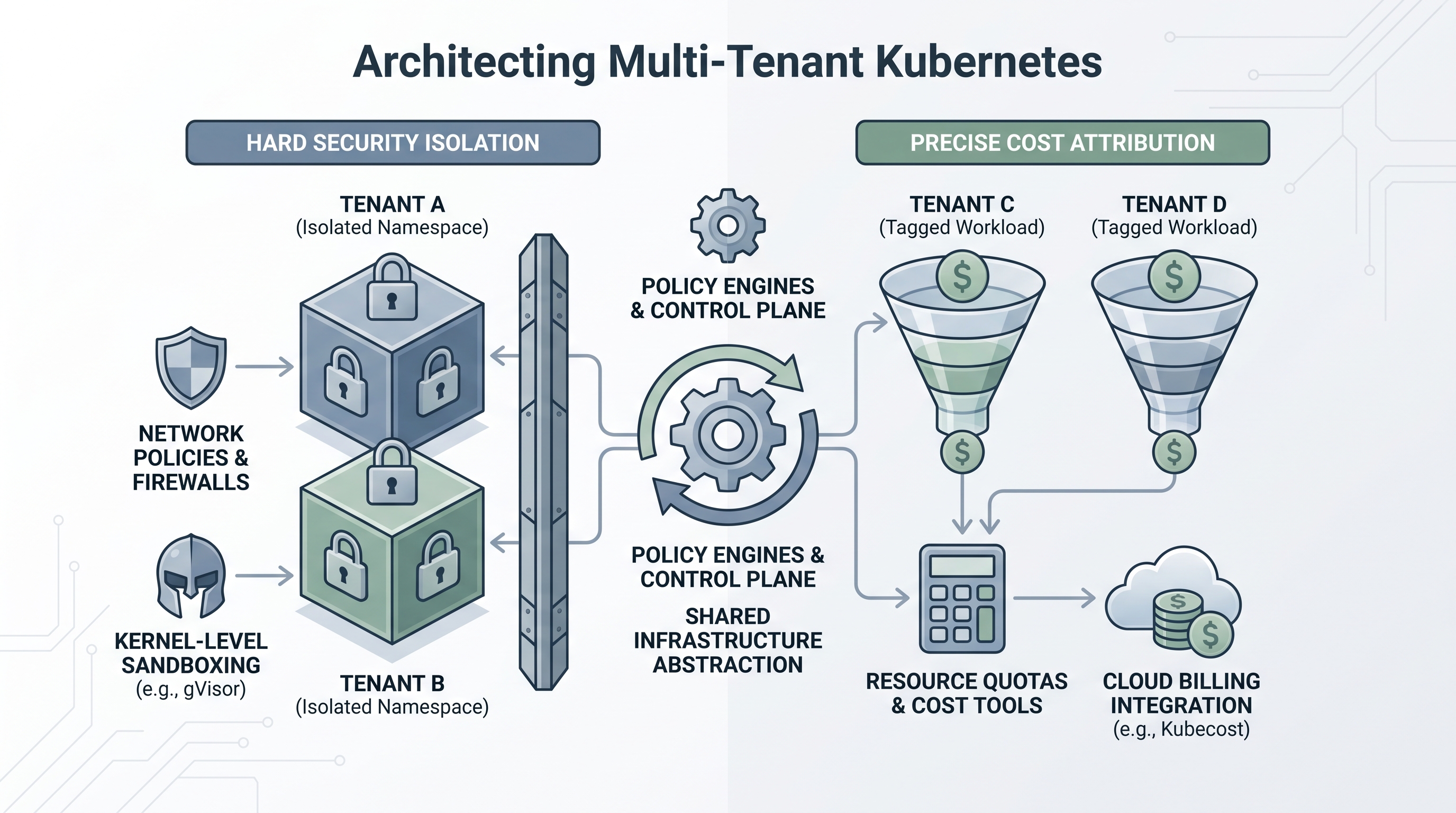
For modern enterprise platform engineering teams, running dedicated Kubernetes clusters for every team, project, or customer is an operational anti-pattern. It leads to massive resource fragmentation, operational overhead, and a sprawling cloud bill. Multi-tenancy is the logical solution: consolidating workloads onto shared, high-density clusters. However, multi-tenancy introduces a fundamental tension between two critical operational pillars: security isolation (ensuring Tenant A cannot access or disrupt Tenant B) and cost attribution (precisely calculating how much of the shared cluster's cloud bill belongs to Tenant A vs. Tenant B).
In a soft multi-tenancy model, tenants are trusted colleagues who share a cluster with minimal boundaries, relying primarily on Kubernetes namespaces. In a hard multi-tenancy model—essential for SaaS providers, highly regulated industries, and large-scale enterprises—tenants are untrusted, requiring strict isolation at the compute, network, storage, and control plane levels. Merely creating namespaces is insufficient. To achieve enterprise-grade multi-tenancy, platform architects must implement a defense-in-depth security model while simultaneously deploying advanced FinOps allocation strategies to attribute shared cluster costs.
This guide provides a comprehensive blueprint for architecting secure, cost-transparent multi-tenant Kubernetes clusters. We will dive deep into network isolation, container runtime sandboxing, admission controllers, and mathematical models for shared cost attribution, demonstrating how CloudAtler’s unified platform simplifies these complex operations.
Part 1: Implementing Hard Security Isolation
Securing a multi-tenant cluster requires assuming that any tenant container could be compromised. If an attacker gains root access inside a container, your architecture must prevent them from escaping to the underlying node, accessing the Kubernetes API with elevated privileges, or sniffing traffic from adjacent tenants.
1. Cryptographic and Network Isolation via NetworkPolicies
By default, Kubernetes features a flat network topology: any pod can communicate with any other pod across the entire cluster, regardless of namespace. To prevent lateral movement, you must implement a default-deny security posture and explicitly whitelist permitted traffic using NetworkPolicies. For enterprise environments, leveraging a Container Network Interface (CNI) like Cilium (which uses eBPF) or Calico is mandatory to enforce these rules at the kernel level.
Below is an architectural pattern for a strict "Default Deny All" network policy. This should be applied to every tenant namespace as a baseline:
apiVersion: networking.k8s.io/v1
kind: NetworkPolicy
metadata:
  name: default-deny-all
  namespace: tenant-alpha
spec:
  podSelector: {}
  policyTypes:
  - Ingress
  - Egress
Once the default-deny policy is in place, you must selectively allow intra-tenant communication while blocking inter-tenant traffic. The following manifest demonstrates how to allow pods within the tenant-alpha namespace to communicate with each other and resolve DNS via CoreDNS, while explicitly blocking traffic to other namespaces or the cloud provider's metadata service (e.g., 169.254.169.254):
apiVersion: networking.k8s.io/v1
kind: NetworkPolicy
metadata:
  name: allow-intra-namespace-and-dns
  namespace: tenant-alpha
spec:
  podSelector: {}
  policyTypes:
  - Ingress
  - Egress
  ingress:
  - from:
    - namespaceSelector:
        matchLabels:
          kubernetes.io/metadata.name: tenant-alpha
  egress:
  - to:
    - namespaceSelector:
        matchLabels:
          kubernetes.io/metadata.name: tenant-alpha
  # Allow DNS resolution
  - to:
    - namespaceSelector:
        matchLabels:
          kubernetes.io/metadata.name: kube-system
      podSelector:
        matchLabels:
          k8s-app: kube-dns
    ports:
    - protocol: UDP
      port: 53
For organizations operating under strict regulatory compliance frameworks, implementing these policies manually across thousands of namespaces is highly error-prone. Utilizing CloudAtler's unified security management platform ensures that baseline isolation policies are continuously audited, validated, and enforced across all clusters automatically.
2. Hardening the Control Plane: RBAC and Service Accounts
Tenants should never have cluster-wide privileges. Role-Based Access Control (RBAC) must be mapped strictly to namespaces using Roles and RoleBindings instead of ClusterRoles and ClusterRoleBindings. Additionally, you must disable the auto-mounting of API credentials for default service accounts. By default, Kubernetes mounts a service account token inside every pod, which can be leveraged by an attacker if a container is compromised.
In your pod templates, always set automountServiceAccountToken: false unless the application specifically requires direct access to the Kubernetes API. If API access is required, define a dedicated ServiceAccount with the absolute minimum set of permissions (least privilege principle).
3. Enforcing Pod Security Standards (PSS)
The deprecation of PodSecurityPolicies (PSP) made Pod Security Standards (PSS) the native mechanism for enforcing container security. PSS defines three profiles: Privileged, Baseline, and Restricted. In a hard multi-tenant environment, the Restricted profile must be enforced globally on all tenant namespaces. This profile mitigates known privilege escalation vectors by requiring containers to run as non-root, disabling root privilege escalation, restricting volume types, and limiting capabilities.
You can enforce the Restricted profile at the namespace level using native labels:
apiVersion: v1
kind: Namespace
metadata:
  name: tenant-beta
  labels:
    pod-security.kubernetes.io/enforce: restricted
    pod-security.kubernetes.io/enforce-version: latest
To prevent tenants from modifying these labels on their own namespaces, admission controllers such as Kyverno or OPA Gatekeeper must be deployed. These controllers intercept requests to the API server and validate that security policies are met before objects are persisted. Enforcing compliance via automated guardrails ensures that tenants cannot bypass these namespace-level restrictions, maintaining a hardened cluster state.
4. Sandboxed Runtimes: gVisor and Kata Containers
Standard container runtimes (like containerd or CRI-O) share the host operating system's kernel. If a vulnerability exists in the Linux kernel (e.g., Dirty COW, CVE-2022-0185), a compromised container can exploit it to escape to the host node. For untrusted or multi-tenant workloads, executing containers within a sandboxed runtime is highly recommended.
gVisor: An open-source container runtime developed by Google that implements a user-space kernel. It intercepts system calls from the application and handles them in user space, drastically reducing the kernel attack surface.
Kata Containers: Uses lightweight virtual machines (microVMs) to run containers, providing hardware-level isolation while maintaining the performance and lifecycle characteristics of standard containers.
To implement this, register a RuntimeClass in your cluster and instruct tenants to reference it in their Pod specifications:
apiVersion: node.k8s.io/v1
kind: RuntimeClass
metadata:
  name: gvisor
handler: runsc # Configured in containerd to point to gVisor
Then, in the tenant's Pod spec:
spec:
  runtimeClassName: gvisor
  containers:
  - name: untrusted-app
    image: nginx:alpine
Part 2: Precise Cost Attribution and FinOps Strategies
While security isolation keeps tenants safe, cost attribution keeps the business profitable. In a shared Kubernetes cluster, computing the cost of a single namespace is challenging because clusters scale dynamically, utilize heterogeneous node types (spot vs. on-demand), and run shared infrastructure services (ingress controllers, service meshes, monitoring agents) that benefit all tenants.
1. The Anatomy of Kubernetes Costs
To construct an accurate cost model, we must break down a cluster's total cost ($C_{total}$) into three distinct categories:
Direct Tenant Costs ($C_{direct}$): Resources (CPU, Memory, Persistent Volumes) explicitly requested by and allocated to tenant pods.
Idle Costs ($C_{idle}$): Unallocated resources on nodes that are provisioned but not utilized by any workload. This is the "cost of headroom" required for scaling.
Shared Overhead Costs ($C_{shared}$): System services running in namespaces like
kube-system,monitoring, oringress-nginx, along with cloud provider fees (e.g., EKS/AKS control plane fees, load balancers, NAT Gateways).
Mathematically, the total cost of the cluster is represented as:
$C_{total} = \sum C_{direct} + C_{idle} + C_{shared}$
2. Eliminating Noisy Neighbors with ResourceQuotas and LimitRanges
Before attributing costs, you must prevent any single tenant from monopolizing the cluster's resources, which drives up autoscaling costs for everyone. You must enforce ResourceQuotas and LimitRanges on every tenant namespace.
A LimitRange establishes default request and limit constraints for containers within a namespace, preventing developers from deploying pods without resource definitions:
apiVersion: v1
kind: LimitRange
metadata:
  name: tenant-alpha-limits
  namespace: tenant-alpha
spec:
  limits:
  - default:
      cpu: "500m"
      memory: "512Mi"
    defaultRequest:
      cpu: "200m"
      memory: "256Mi"
    type: Container
Simultaneously, a ResourceQuota sets a hard ceiling on the aggregate compute resources a namespace can consume:
apiVersion: v1
kind: ResourceQuota
metadata:
  name: tenant-alpha-quota
  namespace: tenant-alpha
spec:
  hard:
    requests.cpu: "4"
    requests.memory: "8Gi"
    limits.cpu: "8"
    limits.memory: "16Gi"
    pods: "20"
3. Allocating Idle and Shared Costs
Once direct costs are tracked using resource requests (not limits, as cloud providers charge based on provisioned capacity, which maps directly to requests), how do we distribute $C_{idle}$ and $C_{shared}$? There are two primary FinOps methodologies:
Method A: Pro-Rata Allocation (Proportional to Direct Usage)
In this model, idle and shared costs are distributed among tenants based on their percentage of direct resource consumption. If Tenant A consumes 20% of the active compute resources, they are billed for 20% of the idle capacity and 20% of the shared system services.
$Tenant\ Cost = C_{direct\_tenant} + \left( \frac{C_{direct\_tenant}}{\sum C_{direct}} \times (C_{idle} + C_{shared}) \right)$
This method is highly equitable because it incentivizes tenants to optimize their resource requests. If a tenant reduces their footprint, their share of the overhead decreases proportionally.
Method B: Flat-Rate Allocation
Some organizations treat idle capacity as a platform engineering tax, absorbing it into a central infrastructure budget, while allocating only direct costs to tenants. While simpler, this model obscures the true cost of running applications and can lead to massive waste, as tenants have no financial incentive to help minimize cluster-level idle capacity.
To run these complex allocations in real-time, enterprise teams rely on a sophisticated cost impact calculation engine. This enables FinOps teams to ingest actual billing data from AWS, Azure, GCP, or Oracle, map it directly to real-time Kubernetes utilization metrics, and output precise billing reports for each business unit.
4. Establishing a Unified Labeling and Tagging Strategy
Precise cost attribution is impossible without strict metadata hygiene. Kubernetes labels applied to namespaces and workloads must align seamlessly with your cloud provider's cost allocation tags. Every tenant namespace should be labeled with a standardized set of keys:
owner: The engineering team responsible for the namespace (e.g.,billing-team).environment: The deployment stage (e.g.,production,staging).cost-center: The internal corporate ledger code (e.g.,cc-9402).tenant-id: Unique identifier for SaaS customer isolation (e.g.,tenant-customer-xyz).
To enforce this, platform teams should use mutating admission webhooks or policy engines like Kyverno to automatically reject any namespace creation request that lacks these mandatory labels. Manually maintaining these tags across multi-cloud environments is a notorious operational bottleneck. Utilizing CloudAtler's automated tagging capabilities ensures that tags are dynamically propagated from Kubernetes namespaces down to underlying cloud infrastructure resources (such as EBS volumes, load balancers, and network interfaces), eliminating untagged resource leakage.
Part 3: Bridging Security and FinOps: The Unified Architecture
Traditionally, security teams and FinOps teams operate in silos. Security implements isolation policies, occasionally blocking workloads or requiring expensive sandboxed runtimes. FinOps attempts to slash costs, sometimes pushing for extreme node consolidation that can compromise availability or force workloads from different security tiers onto the same physical hardware.
A modern platform engineering architecture must bridge this divide. Here is how a unified approach optimizes both domains:
Operational Vector | Security Imperative | FinOps / Cost Imperative | Unified Resolution Pattern |
|---|---|---|---|
Node Scheduling | Isolate highly sensitive workloads on dedicated physical nodes (Taints & Tolerations). | Maximize node packing density to minimize idle compute costs. | Use node affinity to group similar security-tier workloads together, optimizing bin-packing while maintaining isolation boundaries. |
Storage Isolation | Encrypt data-at-rest with tenant-specific KMS keys. | Avoid over-provisioning Persistent Volumes (PVs). | Implement dynamic volume provisioning with StorageClasses that enforce thin-provisioning and link to tenant KMS keys. |
Runtime Sandboxing | Run untrusted code in gVisor/Kata, which incurs slight CPU/Memory overhead. | Minimize runtime overhead and maximize performance per dollar. | Apply sandboxing selectively. Use admission controllers to route only high-risk pods to sandboxed nodes, keeping standard workloads on cheaper, shared runtimes. |
Achieving this level of synergy requires visibility across the entire cloud stack. Platform leaders must design their systems with comprehensive CIO FinOps solutions in mind, ensuring that security posture changes are immediately evaluated for their financial impact, and cost-reduction strategies are vetted for security compliance before deployment.
Step-by-Step Implementation Blueprint
To put these concepts into practice, follow this step-by-step architectural blueprint to configure a secure, cost-attributed multi-tenant cluster:
Step 1: Set Up the Tenant Namespace with Baseline Security
Create the namespace and apply the mandatory security labels and Pod Security Standards:
kubectl create namespace tenant-prod-gamma
kubectl label namespace tenant-prod-gamma \
  pod-security.kubernetes.io/enforce=restricted \
  pod-security.kubernetes.io/enforce-version=latest \
  owner=gamma-team \
  cost-center=cc-4401 \
  environment=production
Step 2: Apply the Default-Deny Network Policy
Apply the baseline network isolation policy to the newly created namespace to ensure no unauthorized lateral movement can occur:
kubectl apply -f default-deny-all.yaml -n tenant-prod-gammaStep 3: Define Resource Limits and Quotas
Prevent resource exhaustion and noisy neighbor scenarios by applying a strict quota to the namespace:
apiVersion: v1
kind: ResourceQuota
metadata:
  name: gamma-resource-quota
  namespace: tenant-prod-gamma
spec:
  hard:
    requests.cpu: "8"
    requests.memory: "16Gi"
    limits.cpu: "16"
    limits.memory: "32Gi"
Apply this using: kubectl apply -f gamma-resource-quota.yaml
Step 4: Configure Node Isolation via Taints and Tolerations
If Tenant Gamma runs highly sensitive PCI-compliant workloads, isolate them on dedicated nodes. First, label and taint a specific node group:
kubectl taint nodes node-secure-01 dedicated=tenant-gamma:NoSchedule
kubectl label nodes node-secure-01 security-tier=high
Then, ensure the tenant's deployments contain the corresponding toleration and node affinity:
spec:
  tolerations:
  - key: "dedicated"
    operator: "Equal"
    value: "tenant-gamma"
    effect: "NoSchedule"
  affinity:
    nodeAffinity:
      requiredDuringSchedulingIgnoredDuringExecution:
        nodeSelectorTerms:
        - matchExpressions:
          - key: security-tier
            operator: In
            values:
            - high
This ensures that sensitive workloads are physically separated from general-purpose workloads, satisfying security compliance while allowing the FinOps team to track the exact cost of the dedicated node group and attribute it entirely to Tenant Gamma.
Conclusion: Unify Security and FinOps with CloudAtler
Managing multi-tenant Kubernetes clusters at scale is a continuous balancing act. Implementing hard security isolation through network policies, RBAC, admission controllers, and sandboxed runtimes protects your organization from devastating breaches. Simultaneously, executing precise cost attribution through resource quotas, unified tagging, and advanced idle/shared cost allocation models ensures financial accountability and prevents runaway cloud bills.
However, attempting to build, maintain, and glue together disparate open-source tools to solve these challenges creates immense platform engineering debt. Security vulnerabilities slip through the cracks, and cost reports remain inaccurate, leading to friction between engineering, finance, and security teams.
CloudAtler solves this paradigm. By unifying FinOps, cloud security, and automated operations into a single AI-powered platform, CloudAtler gives you complete visibility and control over your AWS, Azure, GCP, and Oracle environments. With CloudAtler, you can automatically enforce multi-tenant security guardrails, dynamically calculate and attribute shared Kubernetes costs, and optimize your entire multi-cloud infrastructure from a single pane of glass.
All in One Place
Atler Pilot decodes your cloud spend story by bringing monitoring, automation, and intelligent insights together for faster and better cloud operations.