
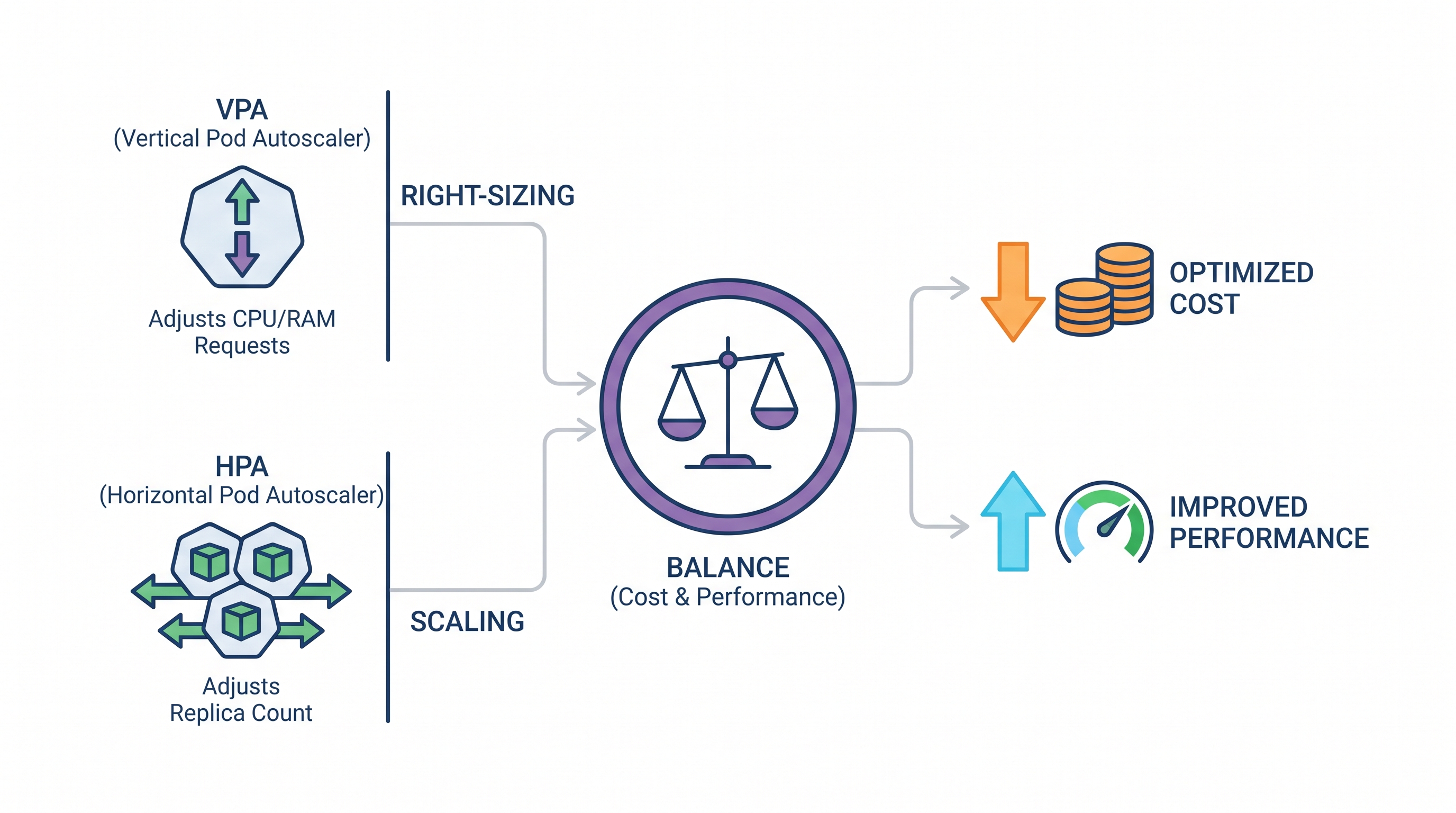
The Kubernetes Resource Paradox: Performance vs. Cost
Kubernetes has revolutionized container orchestration, yet it has introduced a complex operational challenge: resource allocation. In multi-tenant, enterprise-scale clusters, SRE and platform engineering teams consistently struggle with the trade-off between application performance and infrastructure spend. Over-provisioning resource requests and limits leads to vast pools of idle, paid-for compute. Under-provisioning results in CPU throttling, Out-Of-Memory (OOM) kills, and degraded user experiences.
This challenge is known as the "Kubernetes Resource Paradox." Because engineers often lack visibility into real-time utilization profiles, they configure static YAML manifests with arbitrary CPU and memory requests. According to industry datasets, the average Kubernetes cluster runs at less than 15% CPU utilization, meaning organizations routinely waste up to 85% of their cloud compute spend on idle capacity. To solve this at scale, platform teams must shift from static configurations to dynamic, automated right-sizing.
Using an enterprise financial operations platform allows organizations to establish visibility over these hidden costs. However, continuous cost optimization requires a deep understanding of Kubernetes' native autoscaling mechanisms: the Horizontal Pod Autoscaler (HPA) and the Vertical Pod Autoscaler (VPA). When configured correctly, these two controllers dynamically adjust container resources and replica counts, aligning infrastructure footprint with real-time application demand.
The Mechanics of Horizontal Pod Autoscaling (HPA)
The Horizontal Pod Autoscaler (HPA) scales the number of Pod replicas in a deployment, statefulset, or replica set based on observed CPU utilization, memory usage, or custom/external metrics. It operates as a control loop with a default period of 15 seconds (configured via the --horizontal-pod-autoscaler-sync-period flag on the Kubernetes Controller Manager).
The HPA Scaling Algorithm
The HPA controller calculates the desired replica count using a specific mathematical formula. It evaluates metrics across all targeted, active Pods in a deployment:
DesiredReplicas = ceil[ CurrentReplicas * ( CurrentMetricValue / TargetMetricValue ) ]For example, if a deployment is currently running 3 replicas, and the average CPU utilization is at 80% while the target utilization is configured at 50%, the calculation is:
DesiredReplicas = ceil[ 3 * ( 80 / 50 ) ] = ceil[ 4.8 ] = 5 replicasTo prevent drastic scaling fluctuations (known as "thrashing" or "flapping"), the HPA controller maintains a stabilization window. By default, the downscale stabilization window is 300 seconds (5 minutes). This means the controller remembers the highest recommended replica count within the last 5 minutes and uses that value to prevent premature scale-downs during brief traffic lulls.
Advanced HPA Configuration with Stabilization Windows
Since the introduction of the autoscaling/v2 API, platform engineers can customize scale-up and scale-down behaviors using policies. This is crucial for applications with highly volatile traffic spikes or slow startup times.
apiVersion: autoscaling/v2
kind: HorizontalPodAutoscaler
metadata:
  name: payment-service-hpa
  namespace: production
spec:
  scaleTargetRef:
    apiVersion: apps/v1
    kind: Deployment
    name: payment-service
  minReplicas: 2
  maxReplicas: 20
  metrics:
  - type: Resource
    resource:
      name: cpu
      target:
        type: Utilization
        averageUtilization: 65
  behavior:
    scaleUp:
      stabilizationWindowSeconds: 0
      policies:
      - type: Percent
        value: 100
        periodSeconds: 15
      - type: Pods
        value: 4
        periodSeconds: 15
      selectPolicy: Max
    scaleDown:
      stabilizationWindowSeconds: 300
      policies:
      - type: Percent
        value: 10
        periodSeconds: 60
      selectPolicy: Min
In this configuration, the scaleUp behavior is optimized for rapid scaling: it allows the cluster to double the replica count (100% increase) or add up to 4 pods every 15 seconds, selecting whichever value is larger (selectPolicy: Max). Conversely, the scaleDown behavior is conservative, limiting termination to 10% of running pods per minute, with a 5-minute stabilization window to ensure the system does not prematurely de-provision compute during temporary network drops.
The Mechanics of Vertical Pod Autoscaling (VPA)
While HPA scales horizontally by adding or removing pods, the Vertical Pod Autoscaler (VPA) scales vertically by adjusting the CPU and memory requests and limits of existing pods. VPA is essential for stateful workloads, single-replica applications, or microservices where horizontal scaling introduces latency or cache synchronization issues.
The Architectural Components of VPA
The VPA architecture consists of three distinct, decoupled controllers:
Recommender: Monitors historical and real-time resource utilization (retrieved via the Metrics Server or Prometheus) and computes optimal CPU and memory recommendations using an exponential decaying histogram algorithm. It prioritizes recent data points while retaining historical peaks.
Updater: Monitors active pods and compares their current resource configurations against the recommendations generated by the Recommender. If a pod requires modification, the Updater evicts the pod, forcing the deployment controller to recreate it.
Admission Controller: A mutating admission webhook that intercepts pod creation requests. When a new pod is scheduled (often as a result of an eviction by the Updater), the Admission Controller overrides the static resource requests and limits in the pod manifest with the VPA's recommended values.
VPA Operating Modes
The VPA can be configured to run in one of four modes, defining its level of operational autonomy:
Off: The VPA only calculates resource recommendations and writes them to the VPA custom resource status. It does not modify pods. This is the safest mode for staging and initial production analysis.
Initial: The VPA assigns resource recommendations only when a pod is first created. It will not evict running pods to apply updated recommendations.
Recreate: The VPA assigns recommendations at pod creation and will actively evict running pods if their resource usage significantly deviates from the recommendation, provided the pod can be recreated.
Auto: Currently identical to
Recreate. It automates the entire lifecycle, evicting pods dynamically to apply updated resource limits.
Example VPA Manifest
Below is an example of a VPA configured in Auto mode with strict resource boundaries to prevent runaway vertical scaling:
apiVersion: autoscaling.k8s.io/v1
kind: VerticalPodAutoscaler
metadata:
  name: order-processing-vpa
  namespace: production
spec:
  targetRef:
    apiVersion: apps/v1
    kind: Deployment
    name: order-processing
  updatePolicy:
    updateMode: "Auto"
  resourcePolicy:
    containerPolicies:
      - containerName: '*'
        minAllowed:
          cpu: 100m
          memory: 128Mi
        maxAllowed:
          cpu: 4000m
          memory: 8Gi
        controlledResources: ["cpu", "memory"]
        controlledValues: RequestsAndLimits
Setting minAllowed and maxAllowed is a critical operational best practice. Without these guardrails, a memory leak could cause the VPA to continuously scale up memory requests until the pod consumes an entire node, driving up cloud costs and potentially destabilizing other workloads on that host.
The Coexistence Challenge: Resolving the HPA-VPA Conflict
A common pitfall in Kubernetes administration is configuring both HPA and VPA to scale the same workload based on the same metrics (typically CPU and memory utilization). This setup creates a dangerous race condition.
The Conflict Scenario
Imagine a deployment running at 85% CPU utilization. The HPA controller detects high utilization and determines that it needs to scale out from 3 to 6 replicas. Simultaneously, the VPA Recommender detects the same high utilization and determines that the pod's CPU requests are too low, triggering the Updater to evict the pods to scale them vertically.
As pods are evicted and restarted, the active replica count drops, causing the remaining pods to experience even higher loads. The HPA responds by demanding more replicas, while the VPA continues to adjust resource requests. This loop can lead to cascading failures, application downtime, and unpredictable cloud expenditures.
Architectural Strategies for Coexistence
To safely run both horizontal and vertical autoscaling within the same cluster, SREs must decouple the metrics and responsibilities of each controller.
Strategy 1: Decouple Scaling Metrics
Configure the HPA to scale based on application-specific, custom, or external metrics—such as HTTP request rate, queue depth (e.g., RabbitMQ, SQS), or database connection counts—using KEDA (Kubernetes Event-driven Autoscaling). Concurrently, assign VPA to manage CPU and memory requests in Auto mode. Because HPA is reacting to business demand and VPA is optimizing resource efficiency, they do not directly conflict.
Strategy 2: Run VPA in "Off" Mode for Continuous Right-Sizing
For workloads scaling horizontally on CPU and memory via HPA, configure VPA to run in Off mode. In this mode, the VPA continuously analyzes utilization patterns and outputs recommendations without evicting pods.
These recommendations can then be ingested by an automated performance management platform or applied during maintenance windows. This approach provides the data-driven benefits of vertical right-sizing without the operational risks of runtime pod evictions.
FinOps and Node-Level Scaling Integration
Right-sizing pods is only half the battle. Pod-level autoscaling (HPA/VPA) must align with node-level autoscaling (Cluster Autoscaler or Karpenter) to realize actual financial savings. If VPA reduces a pod's memory request from 4Gi to 1Gi, but the underlying virtual machine instance size remains unchanged, the organization continues to pay the cloud provider for the idle capacity of the node.
The Downstream Impact on Node Autoscalers
The Cluster Autoscaler and Karpenter operate by watching for "unschedulable" pods (scale-up trigger) or underutilized nodes (scale-down trigger). When VPA or SREs reduce pod resource requests, they increase the packing density of the existing nodes. This allows the node autoscaler to safely consolidate workloads onto fewer nodes and terminate empty or underutilized instances.
To maximize this efficiency, organizations should adopt modern node autoscaling patterns, such as Karpenter's "consolidation" feature, which continuously evaluates the cluster state and actively replaces expensive, underutilized nodes with cheaper, right-sized instances.
Enforcing Financial Guardrails
While autoscaling enables elasticity, unbounded autoscaling can lead to "Denial of Wallet" scenarios, where an application bug, traffic spike, or security exploit triggers massive, expensive scaling events. To prevent this, platform teams must establish strict financial and operational boundaries.
By implementing intelligent guardrails, you can ensure that autoscaling policies cannot exceed pre-approved budget limits. These guardrails act as a circuit breaker, alerting platform teams or halting scale-out events if projected spend crosses a designated threshold.
Designing a Closed-Loop Right-Sizing Architecture
For enterprise environments with hundreds of microservices, manually configuring HPAs, VPAs, and resource limits is unsustainable. Organizations require a closed-loop, automated right-sizing pipeline that integrates with GitOps workflows and CI/CD pipelines.
Closed-Loop Right-Sizing Architecture Flow
Observation: Metrics Server, Prometheus, and cloud APIs collect real-time CPU, memory, and network metrics.
Analysis: Recommendation engines analyze historical trends, calculating peak utilization, burst patterns, and resource headroom.
Validation: Recommendations are validated against security policies, SLA requirements, and financial budgets.
GitOps Integration: Validated recommendations are automatically committed back to the Git repository containing the application's Helm charts or Kustomize manifests.
Deployment: The GitOps controller (ArgoCD or Flux) detects the change and applies the updated, right-sized manifests to the cluster.
This GitOps-centric approach ensures that the "source of truth" remains in version control, preventing configuration drift and allowing SRE teams to audit resource changes over time. It also ensures that if a right-sizing action causes an unexpected performance regression, the platform can immediately execute a safe rollback to the previous configuration.
Security and Operational Best Practices
When implementing automated right-sizing, platform engineers must also account for security and workload availability:
1. Pod Disruption Budgets (PDBs)
Because VPA in Auto or Recreate mode evicts pods to apply updates, you must define Pod Disruption Budgets for all production workloads. A PDB ensures that a minimum number or percentage of pods remain highly available during voluntary disruptions (such as VPA evictions or node upgrades).
apiVersion: policy/v1
kind: PodDisruptionBudget
metadata:
  name: billing-service-pdb
  namespace: production
spec:
  minAvailable: 2
  selector:
    matchLabels:
      app: billing-service
2. Avoid Scaling on Memory for HPA
Scaling horizontally based on memory usage can be problematic. If an application suffers from a memory leak, scaling out will not resolve the issue; it will simply replicate the leaking application across more pods, increasing cloud spend while the system eventually crashes. Use CPU or custom application metrics for horizontal scaling, and rely on VPA or manual limits to manage memory bounds.
3. Leverage Machine Learning for Predictive Sizing
Standard VPA algorithms look backward at historical data, which can make them slow to react to rapid traffic shifts. Advanced SRE teams use predictive monitoring to anticipate traffic spikes based on historical weekly patterns, pre-scaling workloads before the demand actually hits the cluster.
Using solutions for Infra & SRE teams that incorporate predictive analytics ensures that performance is maintained during high-traffic events without maintaining a permanent, expensive over-provisioned state.
The CloudAtler Approach: Unifying FinOps and Kubernetes Operations
Achieving the perfect balance between Kubernetes performance and cost requires more than just deploying native controllers. SRE, FinOps, and platform engineering teams need a centralized control plane that bridges the gap between infrastructure metrics and financial outcomes.
The Atler AI engine provides deep visibility into Kubernetes clusters across AWS, Azure, GCP, and Oracle Cloud. By correlating real-time resource utilization with billing data, CloudAtler identifies misconfigured HPAs, conflicting VPAs, and idle node capacity. It automatically generates safe, validated right-sizing recommendations and applies them through your existing GitOps pipelines, complete with automated rollbacks and cost-impact forecasting.
All in One Place
Atler Pilot decodes your cloud spend story by bringing monitoring, automation, and intelligent insights together for faster and better cloud operations.