
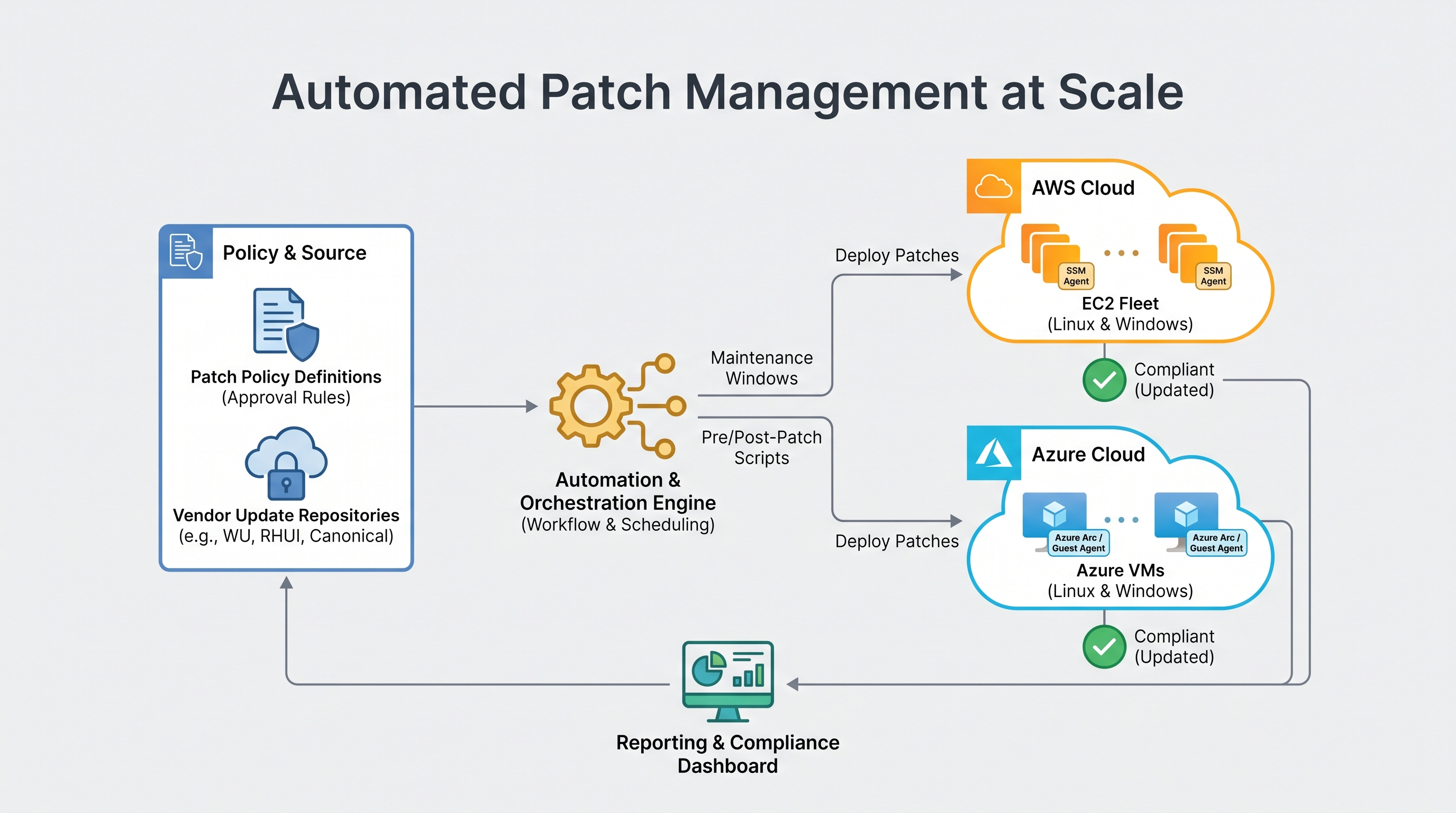
The Multi-Cloud Patching Dilemma: Scale, Velocity, and Risk
For modern enterprises operating hybrid and multi-cloud topologies, maintaining a robust security posture while ensuring application availability is a constant balancing act. Operating system vulnerabilities (such as kernel exploits, privilege escalations, and remote code execution bugs) emerge daily. Patching these vulnerabilities across thousands of instances scattered across Amazon Web Services (AWS) and Microsoft Azure is no longer a task that can be managed with cron jobs and shell scripts.
The core challenge lies in the fundamental architectural differences between the cloud providers. AWS relies on Systems Manager (SSM) Patch Manager, utilizing SSM Agents, IAM instance profiles, and S3-based logging. Microsoft Azure relies on Azure Update Manager (AUM), leveraging the Azure VM Agent, extension-based architectures, and Azure Resource Graph. Attempting to manage these systems in isolation leads to fragmented visibility, inconsistent compliance reporting, and operational silos.
When SRE and infrastructure operations teams attempt to bridge this gap manually, they face significant friction. Maintenance windows conflict, ephemeral auto-scaling groups tear down instances before patches can be registered, and critical stateful workloads suffer unplanned outages due to misconfigured reboot behaviors. To solve this, organizations must design a unified, automated orchestration framework that treats both clouds as first-class citizens while respecting their native execution mechanics.
Architecting Native Execution: AWS SSM Patch Manager
To orchestrate updates effectively, we must first understand the native mechanics of each cloud. In AWS, the control plane for patching is AWS Systems Manager (SSM). Understanding how SSM executes commands at the OS level is critical for designing a reliable, automated pipeline.
1. The SSM Agent and IAM Instance Profiles
The SSM Agent must be installed and running on the EC2 instance. It polls the Systems Manager service to check for pending commands. For the agent to communicate with the SSM APIs, the instance must have an IAM role attached with the AmazonSSMManagedInstanceCore managed policy. This policy allows the agent to perform actions such as registering with the service, updating association status, and writing execution logs to Amazon CloudWatch and S3.
2. Patch Baselines and Rulesets
An SSM Patch Baseline defines which patches are approved for installation. You can use AWS-provided default baselines (such as AWS-AmazonLinux2DefaultPatchBaseline) or create custom baselines. Custom baselines allow you to filter patches by classification (e.g., Security, CriticalUpdates), severity (e.g., Critical, Important), and auto-approval delay (e.g., approve patches 7 days after release to allow for staging environment validation).
3. Maintenance Windows and Run Commands
Patch execution is orchestrated via SSM Maintenance Windows, which define the schedule, duration, registered targets (using resource tags), and tasks. The actual patching task executes the AWS-RunPatchBaseline document via SSM Run Command. This document supports two main operations:
Scan: Scans the instance and generates a list of missing, installed, and failed patches, reporting the compliance state back to SSM Inventory.
Install: Scans the instance, installs missing approved patches, and initiates a reboot if required by the patch configuration.
Below is an example of a Terraform configuration defining a custom AWS SSM Patch Baseline for enterprise Red Hat Enterprise Linux (RHEL) instances:
resource "aws_ssm_patch_baseline" "rhel_baseline" {
  name             = "rhel-enterprise-security-baseline"
  operating_system = "REDHAT_ENTERPRISE_LINUX"

  approval_rule {
    approve_after_days = 7
    compliance_level   = "CRITICAL"

    patch_filter {
      key    = "CLASSIFICATION"
      values = ["Security", "Bugfix"]
    }

    patch_filter {
      key    = "SEVERITY"
      values = ["Critical", "Important"]
    }
  }

  approved_patches_compliance_level = "HIGH"
  description                       = "Production RHEL Patch Baseline for Security and Critical Updates"
}
Architecting Native Execution: Azure Update Manager
In the Azure ecosystem, Azure Update Manager (AUM) serves as the native SaaS solution for managing and assessing updates for virtual machines. Unlike its predecessor (Azure Automation Update Management), AUM does not require a Log Analytics workspace or an Azure Automation account, significantly reducing latency and architectural complexity.
1. Extension-Based Architecture
AUM leverages the Azure VM Agent to install the Microsoft.CPlat.Core.LinuxPatchExtension (for Linux) or Microsoft.Compute.WindowsAgent.OSPatchingExtension (for Windows). These extensions communicate directly with native OS package managers (such as apt, yum, or Windows Update Agent) to query and apply updates.
2. Maintenance Configurations and Dynamic Scoping
AUM uses Azure Resource Manager (ARM) resources called Maintenance Configurations to define schedules and update rules. One of AUM's most powerful features is dynamic scoping. Instead of statically assigning VMs to a maintenance schedule, you can define a dynamic scope query using Azure Resource Graph. This query automatically includes any VM matching specific tags, resource groups, or subscriptions at the exact moment the maintenance window starts.
The following Bicep template demonstrates how to deploy an Azure Maintenance Configuration designed to target production Linux VMs:
resource maintenanceConfig 'Microsoft.Maintenance/publicMaintenanceConfigurations@2022-11-01-preview' = {
  name: 'prod-linux-patch-schedule'
  location: resourceGroup().location
  properties: {
    maintenanceScope: 'InGuestPatch'
    maintenanceWindow: {
      startDateTime: '2025-04-01 02:00'
      duration: '03:55'
      timeZone: 'UTC'
      recurEvery: '1Week Saturday'
    }
    visibility: 'Custom'
    extensionProperties: {
      InGuestPatchMode: 'User'
    }
    installPatches: {
      linuxParameters: {
        classificationsToInclude: [
          'Critical'
          'Security'
        ]
        packageNameMasksToExclude: [
          'kernel*'
          'docker*'
        ]
      }
      rebootSetting: 'IfRequired'
    }
  }
}
Building a Unified Multi-Cloud Orchestration Framework
Operating separate execution pipelines for AWS and Azure introduces substantial governance overhead. To achieve true operational efficiency, organizations must implement a unified orchestration layer. This layer is responsible for scheduling, compliance aggregation, dynamic targeting, and execution safety across both cloud environments.
To implement this successfully, your orchestration framework must address three critical architectural patterns:
1. Declarative Dynamic Targeting
Avoid hardcoding instance IDs or VM names in your orchestration scripts. Instead, leverage a standardized tagging schema across both clouds. For example, use tags like PatchGroup=Prod-Group-A, Env=Prod, and OSClass=Linux.
The orchestration layer must resolve these tags in real-time. In AWS, this is done using SSM Target Groups. In Azure, this utilizes Azure Resource Graph queries within AUM Maintenance Configurations. This ensures that auto-scaled or newly provisioned instances are automatically enrolled in the correct patching cycle without manual intervention.
2. Decoupling Ephemeral vs. Stateful Workloads
A major architectural mistake is treating all virtual machines identically. Your orchestration framework must bifurcate workloads based on their statefulness:
Stateful Workloads (Database servers, legacy monoliths): These require in-place patching. The orchestration engine must coordinate with application-level APIs to gracefully drain connections, stop services, execute the native patch manager (SSM or AUM), reboot, verify service health, and rejoin the cluster.
Ephemeral Workloads (Auto Scaling Groups, Virtual Machine Scale Sets): In-place patching of ephemeral instances is an anti-pattern. If an instance is replaced by an auto-scaling event, the new instance will revert to the unpatched base image. For these workloads, the pipeline must orchestrate an immutable image build (using Packer or EC2 Image Builder), validate the new AMI/VM image, and execute a rolling update of the scaling group.
To streamline this process, teams can implement CloudAtler Patch Intelligence. This feature automatically analyzes the patch state of running instances and base images, determining which nodes require immediate replacement and which can safely wait for the next scheduled image cycle, eliminating redundant build and test loops.
3. Centralized Telemetry and Reporting
Native tools output compliance data to cloud-specific destinations: AWS SSM writes to S3 and SSM Inventory, while Azure AUM writes to Azure Resource Graph and Log Analytics. A unified control plane must ingest both data streams, normalize the schemas, and present a single pane of glass showing current patch compliance, active failures, and pending CVE exposures.
Feature / Capability | AWS Systems Manager (SSM) | Azure Update Manager (AUM) |
|---|---|---|
Agent Dependency | SSM Agent (Daemon/Service) | Azure VM Agent + Patch Extension |
Targeting Mechanism | Resource Tags, Resource Groups | Dynamic Scopes (Resource Graph), Tags |
Execution Trigger | Maintenance Windows, EventBridge, Run Command | Maintenance Configurations, Event Grid, REST API |
Logging & Telemetry | S3, CloudWatch Logs, SSM Inventory | Azure Resource Graph, Log Analytics |
Mitigating Downtime with Advanced Rollback Strategies
No matter how thoroughly a patch is tested in a staging environment, production updates will occasionally introduce regressions. A kernel update might break a proprietary driver, or a security library patch could introduce a performance bottleneck. To guarantee high availability, your multi-cloud patching pipeline must incorporate automated, pre-emptive safe-rollback mechanisms.
1. Pre-Patch Snapshot Orchestration
Before any patch execution command is sent to an instance, the orchestration layer must trigger a crash-consistent snapshot of all attached block storage volumes.
In AWS: Invoke the
ec2:CreateSnapshotsAPI or trigger an AWS Backup on-demand job for the target instances.In Azure: Execute a REST call to create an Azure Managed Disk Restore Point or a VM-level snapshot.
These snapshots must be bound to a strict lifecycle policy. If the patching run succeeds and post-patch validation passes, the snapshots should be automatically purged after 48 hours to avoid runaway storage costs.
2. Post-Patch Health-Check Validation Loops
Once patching completes and the instance successfully reboots, the orchestration engine must execute a series of automated "smoke tests." These tests should verify both system-level health and application-level readiness:
System-Level: Verify that core system daemons are running, CPU/Memory utilization is within normal parameters, and disk mounts are intact.
Application-Level: Probe local HTTP health endpoints (e.g.,
curl -f http://localhost:8080/health), query local database connection pools, and verify that the instance is successfully receiving traffic from the load balancer (AWS ALB Target Group or Azure Application Gateway Backend Pool).
3. Implementing Automated Safe Rollbacks
If the health check fails, or if an instance fails to boot within a specified timeout window, the orchestration layer must automatically trigger a rollback. For stateful instances, this means shutting down the corrupted VM, detaching the system disk, and attaching a new disk restored from the pre-patch snapshot.
Implementing this logic manually across both AWS and Azure requires thousands of lines of complex Lambda functions and Azure Functions. Organizations looking to eliminate this engineering overhead can leverage automated safe rollbacks. This provides a unified, declarative policy engine that handles snapshot lifecycle management, health validation, and automated disk restoration natively across both cloud providers, ensuring zero-touch recovery from failed updates.
The FinOps of Patching: Calculating and Minimizing Operational Overhead
While patch management is primarily viewed through a security lens, it has a direct and often unmeasured impact on cloud spend. Unoptimized patching pipelines can waste thousands of dollars per month in idle compute, redundant storage, and unnecessary data transfer. Understanding the financial impact of patching operations is essential for modern cloud engineering teams.
1. Compute Overhead During Patching Runs
When executing patches across a large fleet, instances must be online, active, and processing update packages. If you patch instances sequentially, or if your maintenance windows are excessively long (e.g., 4-hour windows for workloads that take 10 minutes to patch), you incur substantial compute charges. This is especially true if you spin up auxiliary worker instances or staging environments specifically for patch testing.
2. Storage and API Costs of Pre-Patch Snapshots
While pre-patch snapshots are critical for safety, they can quickly drive up your cloud bill if not managed correctly. Creating snapshots of multi-terabyte data volumes before every minor patch run is highly inefficient. Enterprise FinOps strategies should enforce policies that only snapshot system/boot volumes (where OS patches are applied) while excluding large, detached data volumes. Furthermore, orphaned snapshots—snapshots left behind after an instance has been successfully patched and running for weeks—are one of the leading causes of cloud waste.
3. NAT Gateway and Data Transfer Charges
When thousands of EC2 instances or Azure VMs download packages from public repositories (such as Ubuntu's archive servers or Red Hat's CDN), they pull gigabytes of data through cloud NAT gateways. In AWS, NAT Gateway data processing charges ($0.045 per GB in us-east-1) can add up rapidly during a major OS upgrade cycle.
To mitigate this, cloud architects should implement localized package mirrors or VPC Endpoints. For example, routing update traffic through AWS Systems Manager VPC Endpoints keeps traffic within the AWS private network, avoiding NAT Gateway data processing fees entirely. Similarly, in Azure, utilizing private endpoints and local WSUS or repository mirrors within a hub-and-spoke virtual network topology significantly reduces egress and transit costs.
4. Prioritizing CVEs to Reduce Patch Frequency
Not all patches are created equal. Rebuilding images or rebooting production clusters for low-severity patches that pose no actual risk to your environment introduces unnecessary operational risk and cost. By integrating unified security management, organizations can correlate vulnerability intelligence with their cloud configurations. This allows teams to prioritize patching only for critical, actively exploited vulnerabilities (such as those on the CISA Known Exploited Vulnerabilities catalog) while deferring low-risk updates, drastically reducing the frequency of costly reboot cycles.
Enterprise Implementation Blueprint: A Step-by-Step Orchestration Workflow
To bring these concepts together, let us examine an enterprise-grade, step-by-step workflow for executing a coordinated, cross-cloud patching run. This workflow ensures maximum safety, minimal downtime, and complete auditability.
Step 1: Inventory Discovery & Dynamic Scoping
The orchestration engine queries the AWS and Azure APIs to identify all active instances tagged with PatchGroup=Wave-1-DevStg. It verifies that the SSM Agent (AWS) and VM Agent (Azure) are online and healthy. Any instance reporting an unhealthy agent status is flagged in the centralized dashboard for manual remediation prior to the run.
Step 2: Pre-Flight Snapshotting
The orchestration engine initiates snapshot commands for the boot volumes of all target instances. The engine polls the cloud provider APIs until the snapshots reach a "completed" or "usable" state. If a snapshot job fails for a critical production instance, the patching run for that specific instance is aborted to prevent running without a safety net.
Step 3: Application Draining & Service Suspension
For stateful workloads, the orchestration engine executes pre-patch hooks. It communicates with load balancers to put target instances into "draining" mode, allowing active connections to complete gracefully. It then stops critical application services to prevent data corruption during the update and reboot phase.
Step 4: Native Patch Execution
The orchestration engine triggers the native patch execution commands parallelly across both clouds:
AWS: Sends an SSM Run Command executing
AWS-RunPatchBaselinewith theInstalloperation to the targeted EC2 instances.Azure: Invokes the Azure Update Manager API to trigger an on-demand patch installation for the targeted VMs based on the defined Maintenance Configuration.
Step 5: Reboot and Verification Loop
Once patches are applied, the instances are rebooted if required. The orchestration engine waits for the instances to pass virtualization-level health checks (e.g., AWS 2/2 status checks). It then executes the post-patch health-check validation loop, verifying that system daemons are active and the application's local health endpoint returns HTTP 200 OK.
Step 6: Traffic Re-enablement & Cleanup
If all health checks pass, the orchestration engine re-enables traffic routing to the instances via the load balancers. The pre-patch snapshots are tagged with an expiration date of 48 hours for automated cleanup. If any instance fails the health check, the engine automatically quarantines the instance, alerts the SRE team, and initiates the automated rollback procedure using the pre-patch snapshot.
Unifying Multi-Cloud Operations with CloudAtler
Architecting, writing, and maintaining custom tooling to handle this level of orchestration across AWS and Azure is a massive engineering undertaking. It diverts valuable SRE resources away from core product engineering and introduces significant maintenance risk.
CloudAtler solves this complexity by providing a unified, AI-powered control plane that completely abstracts the underlying differences between cloud providers. With CloudAtler, you can define a single, declarative patching policy that seamlessly translates into native AWS SSM and Azure Update Manager executions.
By combining robust patch compliance tracking with real-time FinOps cost-impact calculations, CloudAtler ensures your systems remain highly secure and fully optimized. The platform automatically manages pre-patch snapshots, evaluates post-patch application health, and executes safe rollbacks if an update introduces instability—all while keeping a strict eye on compute overhead and storage waste.
Stop wrestling with fragmented consoles, brittle automation scripts, and unpredictable cloud bills. Unify your cloud security, operations, and FinOps into a single, cohesive strategy.
All in One Place
Atler Pilot decodes your cloud spend story by bringing monitoring, automation, and intelligent insights together for faster and better cloud operations.