
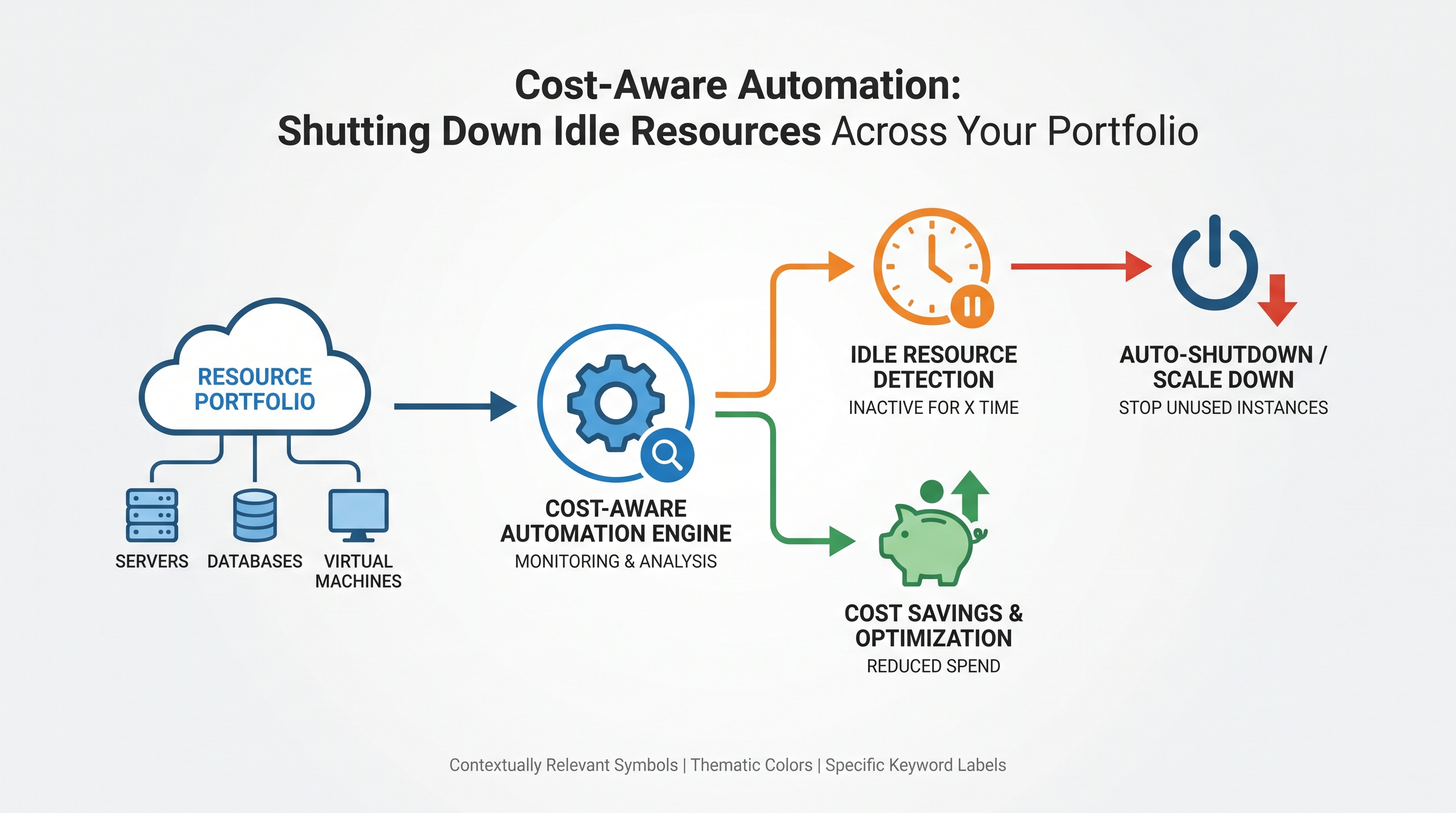
The Pervasive Challenge of Cloud Sprawl and Idle Resources
In the relentless pursuit of agility and innovation, enterprises have embraced multi-cloud architectures with unprecedented enthusiasm. However, this distributed environment, while offering immense strategic advantages, often gives rise to a silent, insidious problem: cloud sprawl and the proliferation of idle resources. Virtual machines, databases, storage volumes, and network components spun up for short-term projects, testing, or development, frequently outlive their active utility but continue to incur costs. This unmanaged resource lifecycle represents a significant drain on IT budgets, often accounting for 30-40% of total cloud spend, according to industry benchmarks.
Beyond the financial implications, idle resources pose a tangible security risk. Forgotten instances may lack critical patches, proper access controls, or continuous monitoring, creating an open backdoor for malicious actors. Addressing this dual challenge of cost inefficiency and security vulnerability requires more than periodic manual reviews; it demands a strategic, automated approach rooted in FinOps principles and robust cloud security practices. This is where cost-aware automation becomes indispensable, transforming reactive cleanup into proactive, intelligent resource management across your entire AWS, Azure, GCP, and Oracle cloud portfolio.
Understanding the Silent Drain: Defining and Quantifying Idle Cloud Resources
Before we can automate the shutdown of idle resources, we must first precisely define what "idle" means within a dynamic cloud context and understand its multifaceted impact. Idleness is not a binary state but a spectrum, often characterized by low utilization thresholds over extended periods, or resources that are simply no longer needed but remain active.
Common Culprits of Cloud Idleness:
Forgotten Dev/Test Environments: Non-production environments, often ephemeral in nature, are frequently left running 24/7 long after their immediate purpose has been served.
Over-Provisioned Resources: Instances or databases provisioned with excessive CPU, memory, or storage capacity, leading to consistently low utilization rates. While not strictly "idle," they represent wasted capacity.
Orphaned Resources: Storage volumes (e.g., EBS volumes, Azure Disks) or network interfaces that remain after their associated compute instances have been terminated.
Schedule-Based Needs: Resources required only during business hours or specific testing windows, but left running overnight or on weekends.
Unused Snapshots/Backups: Old or redundant data backups and snapshots accumulating storage costs.
Load Balancers/Gateways: Network components with no backend targets or inbound traffic.
Quantifying the Financial and Security Impact:
The financial impact is straightforward: every hour an idle resource runs, it consumes budget without delivering value. For a large enterprise, this can translate into millions of dollars annually. Consider a scenario where 100 t3.medium EC2 instances (approx. $0.0416/hour) are left running unnecessarily for 16 hours a day (off-hours) across a year. That's 100 16 365 * $0.0416 = ~$24,275.20 per year for just one type of resource in one region. Multiply this across diverse resource types, multiple accounts, and several cloud providers, and the numbers become staggering.
From a security perspective, idle resources are often neglected. They might not be included in regular patching cycles, lack up-to-date security configurations, or fall outside the scope of active monitoring. An unpatched VM, a forgotten database with default credentials, or an S3 bucket with overly permissive policies, even if technically "idle," remains a potential entry point for attackers, increasing the organization's attack surface and compliance risk. This makes identifying and remediating these resources a critical component of a robust cloud security strategy.
Architecting Cost-Aware Automation: A Multi-Cloud Approach
Implementing cost-aware automation for idle resources requires a structured, multi-phase approach that accounts for the diverse ecosystems of AWS, Azure, GCP, and Oracle Cloud Infrastructure. The core principle is unified visibility, intelligent policy definition, and automated, safe remediation.
Phase 1: Discovery, Visibility, and Tagging Strategy
You cannot optimize what you cannot see. The foundational step is to gain comprehensive, real-time visibility into all resources across your entire cloud portfolio. This is where a unified platform becomes invaluable.
Unified Inventory: Leverage tools that can aggregate resource data from AWS Config, Azure Resource Graph, GCP Asset Inventory, and OCI Resource Manager. This provides a single pane of glass for all compute, storage, network, and database resources. CloudAtler excels in this area, offering a unified dashboard that provides holistic visibility across AWS, Azure, GCP, and Oracle environments, eliminating the blind spots common in multi-cloud operations.
Mandatory Tagging Strategy: A robust tagging strategy is the backbone of effective cost management and automation. Enforce mandatory tags such as
Environment (dev, test, prod),Owner,Project,CostCenter, andSchedule (e.g., business-hours-only). These tags act as metadata filters for defining automation policies. Utilize cloud provider native tagging enforcement (e.g., AWS Tag Policies, Azure Policy, GCP Organization Policies) augmented by platform capabilities for multi-cloud consistency.Usage Monitoring Integration: Collect and analyze utilization metrics (CPU, memory, network I/O, disk I/O, database connections) from Amazon CloudWatch, Azure Monitor, Google Cloud Monitoring, and OCI Monitoring. These metrics are crucial for identifying genuinely idle resources based on actual performance data.
Phase 2: Defining Idleness and Policy Enforcement
With visibility established, the next step is to define what constitutes "idleness" and translate those definitions into actionable policies.
Metrics for Idleness:
Compute (VMs): Average CPU utilization < 5% for 7 days; network I/O < 10 KB/s for 7 days; no active network connections.
Databases: No active connections for 48 hours; CPU utilization < 1% for 7 days; low query throughput.
Storage Volumes: No associated compute instance; no read/write operations for 30 days.
Load Balancers: No active backend targets; zero requests for 7 days.
Policy Creation and Granularity:
Time-Based Policies: For dev/test environments tagged
Environment:devandSchedule:business-hours-only, create policies to stop VMs at 7 PM local time and start them at 7 AM.Usage-Based Policies: Automatically stop or recommend downsizing instances that meet the defined low utilization thresholds for a specified duration.
Tag-Based Policies: Automatically delete resources with a
Cleanup:truetag after a certain period, or quarantine resources with missing mandatory tags.Orphaned Resource Policies: Scan daily for unattached storage volumes or network interfaces and initiate a deletion workflow.
Workflow for Policy Enforcement:
Detection: Automated scanners identify resources matching idleness criteria.
Notification: Alert resource owners via email, Slack, or ticketing systems (e.g., Jira, ServiceNow) about detected idle resources and impending action. Provide a grace period.
Action: If no action is taken by the owner, execute the defined remediation (stop, terminate, snapshot, archive).
Phase 3: Automated Remediation and Orchestration
This is where the rubber meets the road – executing the defined policies through automated scripts and services. The approach varies slightly by resource type and cloud provider.
Compute Resources (EC2, Azure VMs, GCE, OCI Compute)
Stopping vs. Terminating:
Stopping: Ideal for scheduled shutdowns. The instance state is preserved, and you only pay for storage. Data on ephemeral disks is lost.
Terminating: Permanent deletion. Ensure data persistence through snapshots or attached persistent storage before termination.
Implementation Examples:
AWS: Use AWS Lambda functions triggered by Amazon CloudWatch Events (e.g., scheduled cron expressions) or by custom metrics. The Lambda function would use the AWS SDK (e.g., Boto3 in Python) to call
ec2.stop_instances()orec2.terminate_instances()based on tags or instance IDs identified by a prior scan.Azure: Azure Automation Runbooks (PowerShell or Python) can be scheduled or triggered by Azure Monitor alerts. These runbooks interact with Azure Resource Manager APIs to stop or deallocate VMs. Azure DevTest Labs also offers built-in auto-shutdown features for development environments.
GCP: Google Cloud Functions can be triggered by Cloud Scheduler or Pub/Sub messages (from monitoring alerts). Functions use the Google Cloud Client Libraries to call Compute Engine APIs for stopping or deleting instances.
Oracle Cloud Infrastructure (OCI): OCI Functions can be invoked by OCI Events (e.g., scheduled events, metric alarms). Functions use the OCI SDK to manage compute instances.
Pre-Termination Snapshots: Before terminating any compute instance, especially if there's a slight doubt about its data, automate the creation of a final snapshot of its boot and data volumes. This provides a safety net for recovery.
Database Services (RDS, Azure SQL DB, Cloud SQL, OCI DB)
Automating database shutdowns is more complex due to data integrity and connection management.
Stopping vs. Suspending vs. Deleting:
RDS: Supports stopping instances for up to 7 days, after which they automatically start. Good for short-term dev/test shutdowns.
Azure SQL Database: Serverless tier offers auto-pause/resume. Managed Instances or VMs require manual stopping or deallocation.
Cloud SQL: Does not directly support stopping instances. The primary method for cost savings is to delete and recreate or use export/import for long-term storage.
OCI Database: Can be stopped for VMs, but for PaaS offerings like Autonomous Database, scaling down CPU or using the ‘Always Free’ tier for development is often the primary cost optimization.
Graceful Shutdowns: For databases, ensure connection draining and proper shutdown procedures to prevent data corruption. Automate backups before any deletion action.
Storage (EBS, Azure Disks, Persistent Disks, Block Volumes)
Orphaned storage volumes are a common cost sink.
Detection: Regularly scan for unattached volumes. For AWS, check EBS volumes where
Stateis notin-use. For Azure, look for unattached managed disks.Lifecycle Policies: Implement lifecycle management for object storage (S3, Blob Storage, Cloud Storage) to automatically transition old or infrequently accessed data to cheaper tiers (e.g., Glacier, Archive Storage) or delete it after a defined retention period.
Snapshot Management: Automate the deletion of old, redundant snapshots based on retention policies.
Load Balancers & Network Components
Idle Load Balancers: Detect Application Load Balancers (ALBs), Network Load Balancers (NLBs), Azure Application Gateways, and GCP Load Balancers with no registered targets or zero traffic for an extended period. Automate their deletion, but carefully consider dependencies.
Public IPs: Identify and release unassociated Elastic IPs (AWS) or Public IPs (Azure, GCP, OCI) that incur costs.
Container Orchestration (EKS, AKS, GKE, OKE)
While containers are inherently dynamic, idle resources can still exist.
Idle Pods/Deployments: Identify deployments with zero replicas or pods consistently consuming minimal resources. Kubernetes Horizontal Pod Autoscaler (HPA) and Cluster Autoscaler help, but manual intervention might be needed for entirely unused namespaces.
Scaling Down Nodes: Automate the scaling down of Kubernetes worker nodes during off-peak hours for non-production clusters.
Implementing Guardrails and Safe Rollbacks
Automating resource shutdowns carries inherent risks. A misconfigured policy or an erroneous detection can lead to outages and data loss. Therefore, implementing robust guardrails and the capability for safe rollbacks is paramount to maintaining operational stability and stakeholder trust.
Dry Runs and Impact Analysis: Before implementing any automated shutdown policy in production, perform dry runs. Simulate the actions and analyze their potential impact. Identify which applications or services would be affected. CloudAtler offers advanced cost impact calculation and predictive analysis to understand the downstream effects of automation.
Approval Workflows: For critical resources or environments (e.g., production, core services), integrate human approval into the automation workflow. Tools like AWS Step Functions, Azure Logic Apps, or custom webhooks can orchestrate a process where a proposed shutdown requires explicit approval from the resource owner or a FinOps team before execution.
Version Control for Automation Scripts and Policies: Treat your automation scripts, Lambda functions, Azure Runbooks, and policy definitions as code. Store them in version control systems (Git) and apply CI/CD practices. This ensures auditability, reproducibility, and the ability to revert to previous versions if issues arise.
Monitoring and Alerting: Continuously monitor the state of resources after automation actions. Set up alerts for unexpected resource termination, service disruptions, or any anomalies that might indicate an issue with the automation.
Grace Periods and Notifications: Always build in a grace period before an action is taken. Notify resource owners multiple times before a resource is stopped or terminated, giving them a chance to intervene or confirm the action.
Safe Rollbacks: Design your automation with a rollback strategy. For instance, if an instance is stopped, ensure there's an automated way to restart it quickly if an issue is reported. If an instance is terminated, ensure a recent snapshot exists from which it can be restored. CloudAtler’s capabilities include guardrails to prevent unintended actions and safe rollbacks to quickly revert any changes, ensuring operational continuity.
FinOps Integration: Beyond Just Cost Savings
Cost-aware automation is a cornerstone of FinOps, but its value extends beyond mere cost reduction. It fosters a culture of accountability, transparency, and continuous optimization.
Cost Visibility and Attribution: Link every automated shutdown action to tangible cost savings. By tagging resources and tracking their lifecycle, you can accurately attribute savings to specific teams, projects, or environments. This reinforces positive behavior and provides data-driven insights for future budgeting.
Budget Forecasting and Control: Integrate the impact of automated shutdowns into your budget forecasting models. Understanding predictable savings from automation allows for more accurate financial planning and resource allocation. Automated guardrails can also prevent spend overruns by proactively shutting down resources that violate budget policies.
Showback/Chargeback: With precise cost attribution, FinOps teams can implement effective showback or chargeback mechanisms. Teams see the direct financial benefit of managing their resources efficiently, fostering a cost-conscious mindset.
Continuous Optimization Cycle: Cost-aware automation is not a one-time project. It's an iterative process. Regularly review automation policies, adjust thresholds based on observed usage patterns, and identify new types of idle resources. This continuous feedback loop drives ongoing optimization. CloudAtler's financial operations platform provides the tooling to manage this entire lifecycle, from cost visibility and budgeting to automated optimization and reporting.
Resource Right-Sizing Insights: Beyond outright shutdown, automation can provide data to inform right-sizing decisions. If an instance is consistently identified as low-utilization but not fully idle, the system can recommend a smaller instance type, further optimizing costs without stopping the resource entirely.
Security Posture Enhancement through Automation
While the primary driver for idle resource shutdown is often cost, the security benefits are equally compelling and often overlooked.
Reduced Attack Surface: Simply put, fewer active, unmonitored resources mean fewer potential targets for attackers. Every instance, database, or network component that is no longer needed but still running represents an unnecessary exposure. Automating their removal directly shrinks your attack surface.
Improved Patching and Vulnerability Management: By eliminating idle resources, security teams can focus their efforts on the active, critical infrastructure. This allows for more thorough and timely patching cycles, reducing the window of vulnerability. CloudAtler's patch intelligence capabilities can be integrated with your automation workflows to ensure that even active resources are kept secure and compliant.
Ensuring Compliance: Idle resources can still be non-compliant. They might store sensitive data without proper encryption, lack necessary logging, or violate data residency requirements. Automated shutdown ensures these non-compliant resources are not inadvertently contributing to regulatory risk.
Automated Cleanup of Associated Assets: When a resource is terminated, automation can extend to cleaning up associated security groups, IAM roles, policies, and network configurations that are no longer needed. This prevents security debris from accumulating, which can lead to privilege escalation or misconfiguration vulnerabilities.
Enforcing Security Baselines: Automation can be used to enforce security baselines. For example, any new resource spun up without mandatory security tags or configurations could be automatically flagged for review or even quarantined until it meets organizational security policies.
The CloudAtler Advantage: Unifying Multi-Cloud Cost-Aware Automation
The complexity of implementing comprehensive, cost-aware automation across a diverse multi-cloud portfolio (AWS, Azure, GCP, Oracle) can be daunting. Each cloud provider has its own APIs, services, and monitoring tools, creating operational silos and increasing the risk of inconsistent policies and missed optimization opportunities.
CloudAtler addresses these challenges head-on with its AI-powered platform, designed to unify FinOps, cloud security, and automated operations. Here’s how CloudAtler provides a distinct advantage:
Unified Multi-Cloud Inventory and Discovery: CloudAtler provides a single, real-time view of all your cloud resources across AWS, Azure, GCP, and Oracle. This eliminates the need for disparate tools and manual aggregation, ensuring no idle resource goes unnoticed.
AI-Powered Idleness Detection: Our platform leverages advanced AI and machine learning algorithms to intelligently analyze utilization metrics, traffic patterns, and access logs across your entire portfolio. This goes beyond simple CPU thresholds, identifying truly underutilized or orphaned resources with higher accuracy, including complex scenarios like idle database connections or unused serverless functions.
Centralized Policy Engine: Define and enforce consistent cost-aware automation policies from a single control plane, regardless of the underlying cloud provider. Apply time-based, usage-based, or tag-based shutdown policies universally, ensuring governance and compliance across your entire enterprise.
Automated Remediation with Built-in Safety: CloudAtler orchestrates automated shutdown, stop, or deallocation actions across all supported clouds. Our platform incorporates intelligent guardrails and safe rollbacks, mitigating the risk of unintended service disruptions. This includes pre-action notifications, approval workflows, and automated snapshot creation where appropriate.
Real-time Cost Impact Calculation: Instantly see the financial impact of every proposed or executed automation action. CloudAtler provides transparent cost impact calculation, allowing FinOps teams to quantify savings and demonstrate ROI effectively.
Integrated FinOps and Security Workflows: Beyond just cost, CloudAtler unifies your FinOps and cloud security operations. Our platform identifies idle resources that pose security risks, linking cost optimization directly to an improved security posture. This holistic approach ensures that resources are not only cost-efficient but also secure and compliant.
Predictive Monitoring and Budget Control: CloudAtler's AI anticipates future spend patterns and identifies potential areas of waste before they become significant. Our budget forecasting features integrate automation savings, providing a more accurate financial outlook and enabling proactive budget control.
Conclusion
The era of unchecked cloud spending and overlooked security vulnerabilities from idle resources is over. Cost-aware automation is no longer a luxury but a fundamental requirement for any enterprise operating in the cloud. By strategically identifying, defining, and automating the shutdown of idle resources across your multi-cloud portfolio, organizations can unlock substantial financial savings, significantly reduce their attack surface, and foster a more efficient, accountable operational culture.
The journey to true cloud cost optimization and enhanced security is complex, particularly across diverse cloud providers. It demands a unified platform that offers deep visibility, intelligent automation, robust guardrails, and seamless integration with your FinOps and security strategies. CloudAtler provides this comprehensive solution, empowering your organization to transcend the challenges of multi-cloud sprawl and achieve a state of continuous, intelligent cloud optimization.
Don't let idle resources silently drain your budget and expose your enterprise to unnecessary risk. Take control of your cloud spend and fortify your security posture. Discover how CloudAtler can unify your FinOps, cloud security, and automated operations across AWS, Azure, GCP, and Oracle environments.
Ready to transform your cloud operations? Explore CloudAtler today and start your journey towards cost-aware, secure, and automated cloud management.
All in One Place
Atler Pilot decodes your cloud spend story by bringing monitoring, automation, and intelligent insights together for faster and better cloud operations.