
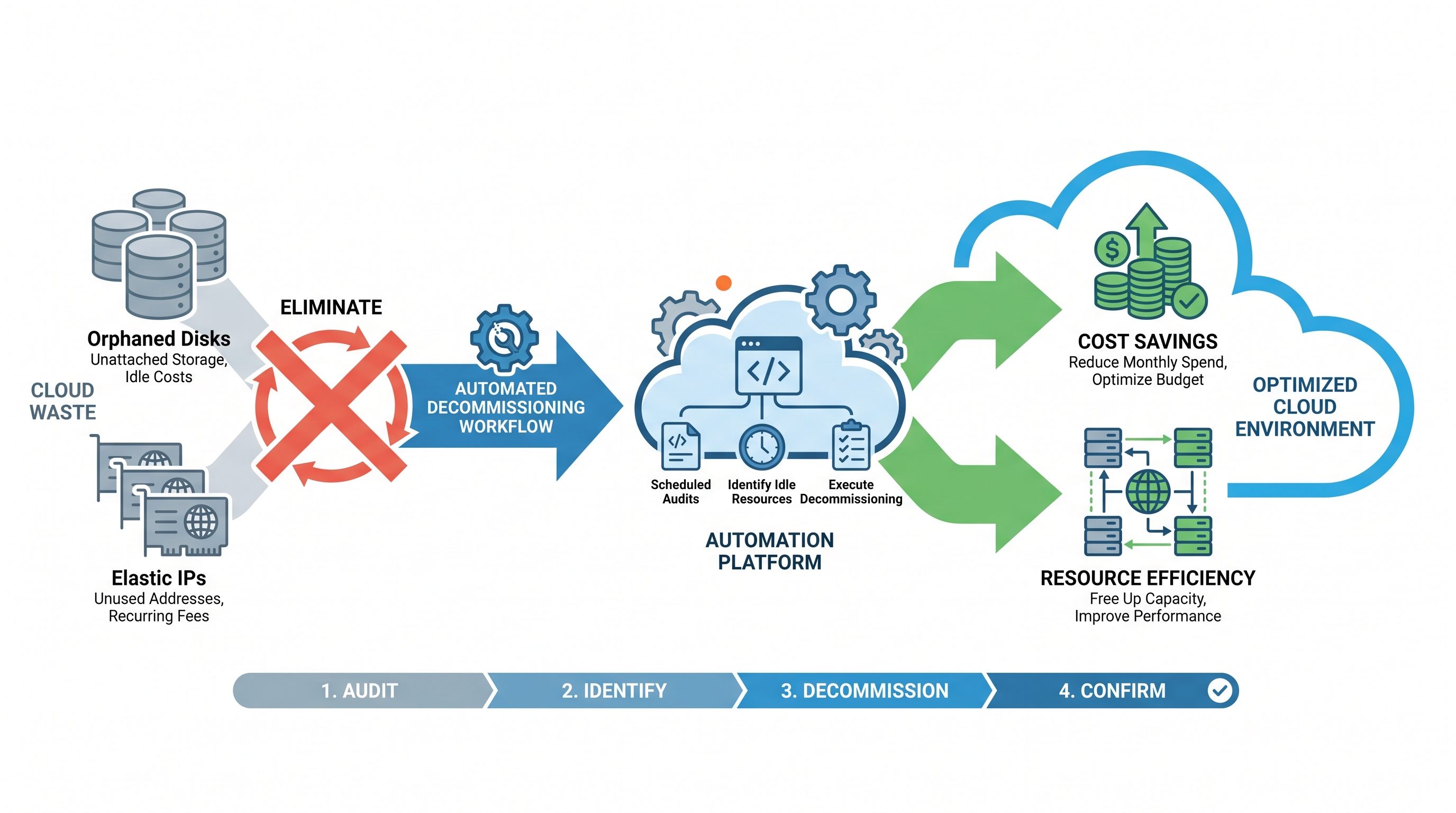
The Hidden Drain of Unattached Cloud Resources
In the era of dynamic cloud provisioning, infrastructure is treated as ephemeral code. Virtual machines, containers, and serverless runtimes are spun up and torn down in seconds. However, this elasticity introduces a critical operational challenge: resource lifecycle misalignment. While compute instances are easily destroyed, their associated persistent block storage volumes (such as AWS EBS, Azure Managed Disks, and GCP Persistent Disks) and static public IP addresses (such as AWS Elastic IPs or Azure Public IPs) are frequently left behind.
These abandoned assets are commonly referred to as "orphaned" resources. Because cloud providers bill for provisioned storage and reserved public IP space regardless of active compute attachment, these orphaned resources quietly accumulate charges. In enterprise environments spanning thousands of cloud accounts, this leakage can easily account for 15% to 30% of the total cloud spend. To combat this, modern enterprise cloud operations require a robust, automated lifecycle management strategy integrated into a comprehensive FinOps platform to continuously discover, evaluate, and decommission waste.
The Anatomy of Orphaned Resources: How They Are Created
Orphaned resources are rarely the result of intentional engineering decisions. Instead, they are the byproduct of automated deployment workflows, manual troubleshooting, and default cloud provider configurations. Understanding how these resources are orphaned is key to preventing their creation at the source.
1. Default Compute Termination Behaviors
When an Amazon EC2 instance or an Azure Virtual Machine is terminated, the default behavior of the cloud platform regarding attached storage depends on how the instance was provisioned. For example, in AWS, the DeleteOnTermination attribute for the root EBS volume is typically set to true by default. However, for any secondary data volumes (non-root EBS volumes) attached to the instance, this attribute defaults to false. When the instance is terminated, the root volume is deleted, but the secondary data volumes persist in an available state, completely unattached and continuing to accrue costs at standard provisioned rates.
2. Decoupled Infrastructure-as-Code (IaC) Lifecycles
Modern DevOps teams use Terraform, OpenTofu, or AWS CloudFormation to manage infrastructure. However, state files can become misaligned. If a Terraform configuration decouples a virtual machine from its storage volume to perform a state migration, or if a resource is removed from code but not properly targeted during a terraform destroy operation, the physical storage disk remains provisioned in the cloud provider’s control plane. Similarly, public IP addresses are often allocated as independent resources within IaC templates. When the associated virtual machine or load balancer is deleted, the IP resource block remains allocated to the subscription or VPC.
3. Manual Troubleshooting and "ClickOps"
During active incidents, engineers often detach block volumes to mount them on recovery instances for filesystem checks or data recovery. Once the incident is resolved, the recovery instance is terminated, but the original volume is forgotten. Similarly, static public IPs are manually provisioned to allow temporary external access to internal staging servers. When the staging server is terminated, the static IP remains reserved in the pool, incurring idle charges.
The Cost and Security Impact of Cloud Leakage
The consequences of orphaned resources extend far beyond a bloated monthly cloud invoice. They introduce significant security vulnerabilities and compliance risks that threaten the integrity of the enterprise cloud perimeter.
The FinOps Math: How Small Resources Create Massive Bills
To understand the scale of financial waste, let us examine the numbers. Consider a mid-sized enterprise operating across AWS and Azure with the following idle resources:
AWS GP3 EBS Volumes: 500 unattached volumes, averaging 200 GB each. At $0.08 per GB-month, this equates to 100,000 GB of idle storage, costing $8,000 per month ($96,000 annually).
Azure Premium SSD v2 Disks: 300 unattached disks, averaging 512 GB each. At approximately $0.10 per GB-month, this equates to 153,600 GB of idle storage, costing $15,360 per month ($184,320 annually).
Unattached AWS Elastic IPs (EIPs): 200 idle EIPs. AWS charges $0.005 per hour for each unattached EIP to encourage IP address conservation. 200 IPs x $0.005/hour x 730 hours/month = $730 per month ($8,760 annually).
In this realistic scenario, the enterprise is wasting $289,080 annually on completely unused, unattached assets. This capital could be reclaimed and reinvested into active product development or strategic initiatives.
The Security and Compliance Risk
From a security perspective, orphaned resources represent unmonitored attack surfaces:
Data Exposure on Orphaned Disks: Orphaned storage volumes often contain sensitive production data, database backups, or application logs. If these volumes are not encrypted at rest using customer-managed keys (CMKs) with strict envelope encryption, or if their access policies are overly permissive, they represent a significant data leak hazard. Furthermore, compliance frameworks such as SOC 2, ISO 27001, and HIPAA require strict asset tracking and lifecycle management; orphaned disks with unmonitored data violate these compliance controls.
IP Hijacking and Reputation Risks: Public IP addresses that are allocated to an organization but unattached to any resource can be targeted for IP hijacking. If DNS records (such as Route 53 or Azure DNS) still point to these unattached IPs (subdomain takeover), malicious actors can claim those IPs or exploit the dangling DNS records to host phishing sites, distribute malware, or execute man-in-the-middle attacks under the organization's trusted domain name.
Manual Discovery vs. Continuous Automated Remediation
Many organizations attempt to solve the orphaned resource problem through manual audits. Once a quarter, a cloud administrator runs a script or checks the cloud console, compiles a list of unattached disks and IPs, and emails engineering teams asking for permission to delete them. This approach is fundamentally flawed:
Point-in-Time Visibility: Manual audits only capture a snapshot of the environment. Within hours of the audit, new orphaned resources are created, leaving the organization exposed to waste and risk for the next 90 days.
Alert Fatigue and Friction: Engineers are busy building features. Receiving a spreadsheet of 500 orphaned disks forces them to manually investigate historical context, leading to delayed responses or flat-out refusal to delete resources out of fear of breaking production workloads.
Lack of Safety Nets: Manual deletion lacks a standardized rollback mechanism. If an administrator deletes a disk that was actually needed for disaster recovery, restoring that data can be difficult or impossible without a pre-deletion snapshot strategy.
The solution is a continuous, automated remediation pipeline that acts as a set of automated guardrails. This pipeline must discover orphaned resources in real-time, evaluate them against safety policies, notify owners, create a backup snapshot, and autonomously decommission the resource after a defined cooling-off period.
Architectural Blueprint: Multi-Cloud Automated Decommissioning
To implement an enterprise-grade decommissioning pipeline, we must design an event-driven architecture that spans multiple cloud environments. The architecture must incorporate safety nets, tagging compliance, and notification channels.
The Safety-First Decommissioning Workflow:
Discovery: Continuously scan cloud accounts for EBS/Managed Disks in an
availableorunattachedstate, and public IPs with no associated network interface or private IP mapping.Exclusion Check: Verify if the resource has an exclusion tag (e.g.,
Keep-Orphaned=True). If yes, skip deletion but flag for architectural review.Age Verification: Check how long the resource has been unattached. Do not delete resources that were detached less than 7 days ago.
Snapshotting (The Safety Net): Before deleting any disk, take a final, encrypted snapshot. Retain this snapshot for 30 days before permanent deletion.
Notification: Post an alert to the engineering team's Slack/Teams channel and log the event in the centralized audit trail.
Decommissioning: Safely delete the disk and release the public IP address back to the cloud provider's pool.
AWS Implementation: Lambda and Boto3 Automation Script
Below is a production-ready Python script designed to run inside an AWS Lambda function. It identifies unattached EBS volumes that have been idle for more than 7 days, creates a pre-deletion snapshot, and deletes the volume. It also identifies and releases unattached Elastic IPs.
import boto3
import datetime
from botocore.exceptions import ClientError

def lambda_handler(event, context):
    ec2 = boto3.client('ec2')
    regions = [region['RegionName'] for region in ec2.describe_regions()['Regions']]

    for region in regions:
        print(f"Scanning region: {region}")
        ec2_regional = boto3.client('ec2', region_name=region)

        # 1. Decommission Orphaned EBS Volumes
        cleanup_orphaned_ebs(ec2_regional, region)

        # 2. Decommission Unattached Elastic IPs
        cleanup_unattached_eips(ec2_regional, region)

def cleanup_orphaned_ebs(ec2_client, region):
    # Retrieve all volumes that are in the 'available' state (unattached)
    volumes = ec2_client.describe_volumes(
        Filters=[{'Name': 'status', 'Values': ['available']}]
    )['Volumes']

    for volume in volumes:
        volume_id = volume['VolumeId']
        tags = {tag['Key']: tag['Value'] for tag in volume.get('Tags', [])}

        # Check for safety exclusion tags
        if tags.get('Keep-Orphaned', '').lower() == 'true':
            print(f"Skipping volume {volume_id} due to Keep-Orphaned tag.")
            continue

        # Determine how long the volume has been unattached
        # Since AWS doesn't store 'detached_time' directly on the volume object,
        # we check the volume creation time or parse CloudTrail. For safety,
        # we will use creation time as a baseline if no other metric exists.
        create_time = volume['CreateTime']
        now = datetime.datetime.now(datetime.timezone.utc)
        age_days = (now - create_time).days

        if age_days >= 7:
            print(f"Volume {volume_id} in {region} has been idle for {age_days} days. Initiating decommissioning.")

            # Create a final safety snapshot
            try:
                snapshot = ec2_client.create_snapshot(
                    VolumeId=volume_id,
                    Description=f"Pre-deletion safety snapshot for orphaned volume {volume_id}"
                )
                snapshot_id = snapshot['SnapshotId']
                print(f"Created safety snapshot {snapshot_id} for volume {volume_id}")

                # Tag the snapshot for auto-cleanup in 30 days
                ec2_client.create_tags(
                    Resources=[snapshot_id],
                    Tags=[
                        {'Key': 'DeleteAfter', 'Value': (now + datetime.timedelta(days=30)).strftime('%Y-%m-%d')},
                        {'Key': 'OriginatingVolume', 'Value': volume_id}
                    ]
                )

                # Delete the orphaned volume
                ec2_client.delete_volume(VolumeId=volume_id)
                print(f"Successfully deleted orphaned volume {volume_id}")

            except ClientError as e:
                print(f"Error processing volume {volume_id}: {e}")

def cleanup_unattached_eips(ec2_client, region):
    # Retrieve all Elastic IPs in the region
    addresses = ec2_client.describe_addresses()['Addresses']

    for addr in addresses:
        # If 'AssociationId' is missing, the IP is unattached
        if 'AssociationId' not in addr:
            allocation_id = addr.get('AllocationId')
            public_ip = addr.get('PublicIp')
            tags = {tag['Key']: tag['Value'] for tag in addr.get('Tags', [])}

            if tags.get('Keep-Orphaned', '').lower() == 'true':
                print(f"Skipping EIP {public_ip} due to Keep-Orphaned tag.")
                continue

            print(f"Releasing unattached Elastic IP {public_ip} (Allocation ID: {allocation_id}) in {region}")
            try:
                ec2_client.release_address(AllocationId=allocation_id)
                print(f"Successfully released EIP {public_ip}")
            except ClientError as e:
                print(f"Error releasing EIP {public_ip}: {e}")
Azure Implementation: Azure CLI Command Pipeline
For Microsoft Azure, infrastructure and SRE teams can leverage Azure CLI combined with Azure resource queries to identify and purge unattached disks and public IP addresses. This script can be scheduled to run daily via Azure DevOps Pipelines or GitHub Actions.
#!/bin/bash
# Azure Unattached Resource Decommissioning Script

# 1. Find and Delete Unattached Managed Disks (excluding those with tag Keep-Orphaned=True)
echo "Scanning for unattached Azure Managed Disks..."
unattached_disks=$(az disk list --query "[?managedBy==null && tags.KeepOrphaned != 'True'].{id:id, name:name, resourceGroup:resourceGroup}" -o tsv)

while read -r disk_id disk_name resource_group; do
    if [ -n "$disk_id" ]; then
        echo "Found unattached disk: $disk_name in Resource Group: $resource_group"

        # Create a safety snapshot before deletion
        snapshot_name="${disk_name}-safety-snap"
        echo "Creating safety snapshot: $snapshot_name"
        az snapshot create --resource-group "$resource_group" --name "$snapshot_name" --source "$disk_id"

        # Delete the disk
        echo "Deleting unattached disk: $disk_name"
        az disk delete --ids "$disk_id" --yes
    fi
done <<< "$unattached_disks"

# 2. Find and Release Unattached Public IP Addresses
echo "Scanning for unattached Azure Public IPs..."
unattached_ips=$(az network public-ip list --query "[?ipConfiguration==null && tags.KeepOrphaned != 'True'].{id:id, name:name}" -o tsv)

while read -r ip_id ip_name; do
    if [ -n "$ip_id" ]; then
        echo "Releasing unattached Public IP: $ip_name"
        az network public-ip delete --ids "$ip_id"
    fi
done <<< "$unattached_ips"
Enterprise Governance and Guardrails
While automation scripts are highly effective, running custom scripts across hundreds of cloud subscriptions can introduce maintenance overhead and security risks. Enterprise-grade decommissioning requires standardized governance mechanisms that operate at the organizational level.
1. Mandatory Tagging Policies
To avoid accidental deletion of critical legacy assets, implement strict tagging policies using AWS Organizations SCPs (Service Control Policies) or Azure Policy. Every provisioned block storage volume and public IP must have metadata tags indicating its owner, cost center, and environment. If a resource lacks these tags, automated guardrails can automatically apply a "quarantine" tag, alerting the security team to investigate before decommission workflows trigger.
2. Service Control Policies (SCPs) for IP Allocations
Preventative controls should be established to limit the blast radius of unmanaged public IPs. For example, you can enforce an AWS SCP that restricts non-admin IAM roles from allocating Elastic IPs unless they are provisioning them within designated public subnets, reducing the likelihood of accidental IP sprawl.
3. Continuous Auditing and Compliance Dashboarding
Security and financial operations teams must have unified visibility into the state of orphaned resources. Using an operational intelligence platform allows leadership to track the reduction of cloud waste over time, showing the direct correlation between automated decommissioning and lowered monthly spend.
How CloudAtler Solves Multi-Cloud Waste Autonomously
Building, maintaining, and debugging custom automation scripts across AWS, Azure, GCP, and Oracle Cloud Infrastructure (OCI) is a massive burden for engineering teams. Cloud APIs change, credentials must be rotated, and custom scripts lack a unified interface for governance and approval workflows.
This is where CloudAtler transforms cloud operations. As an AI-powered platform unifying FinOps, cloud security, and automated operations, CloudAtler eliminates the need for manual scripting and fragmented tools. By deploying Atler AI directly into your multi-cloud control plane, CloudAtler delivers continuous, autonomous optimization:
Cross-Cloud Discovery: Instantly scans your entire estate—including AWS, Azure, GCP, and OCI—to detect orphaned disks, unattached public IPs, idle load balancers, and underutilized compute resources.
Risk-Aware Orchestration: Before taking action, CloudAtler evaluates the security posture and operational context of the target resource. It checks for active connections, verifies encryption standards, and ensures compliance with enterprise retention policies.
Automated Safety Nets: CloudAtler handles the entire lifecycle safely. It automatically provisions pre-deletion snapshots, applies standard metadata tagging, and manages the lifecycle of the safety snapshot, ensuring you can perform safe, one-click rollbacks if a resource is ever needed again.
Intelligent Slack & Teams Workflows: Instead of silent deletions or spammy email lists, CloudAtler routes interactive approval cards directly to the responsible engineering team, allowing them to approve decommissioning or snooze the action with a single click.
Conclusion: Take Control of Your Cloud Perimeter
Orphaned disks and unattached public IPs are more than just a financial leak; they are silent security liabilities that expand your attack surface and degrade operational hygiene. While custom Lambda functions and CLI scripts provide a starting point for remediation, managing these scripts at enterprise scale quickly becomes unfeasible.
Stop paying for cloud resources you don't use and secure your cloud perimeter from dangling IP takeovers and exposed orphaned data. Partner with CloudAtler to unify your FinOps, security, and operational workflows into a single pane of glass. Experience the power of autonomous cloud optimization today.
All in One Place
Atler Pilot decodes your cloud spend story by bringing monitoring, automation, and intelligent insights together for faster and better cloud operations.