
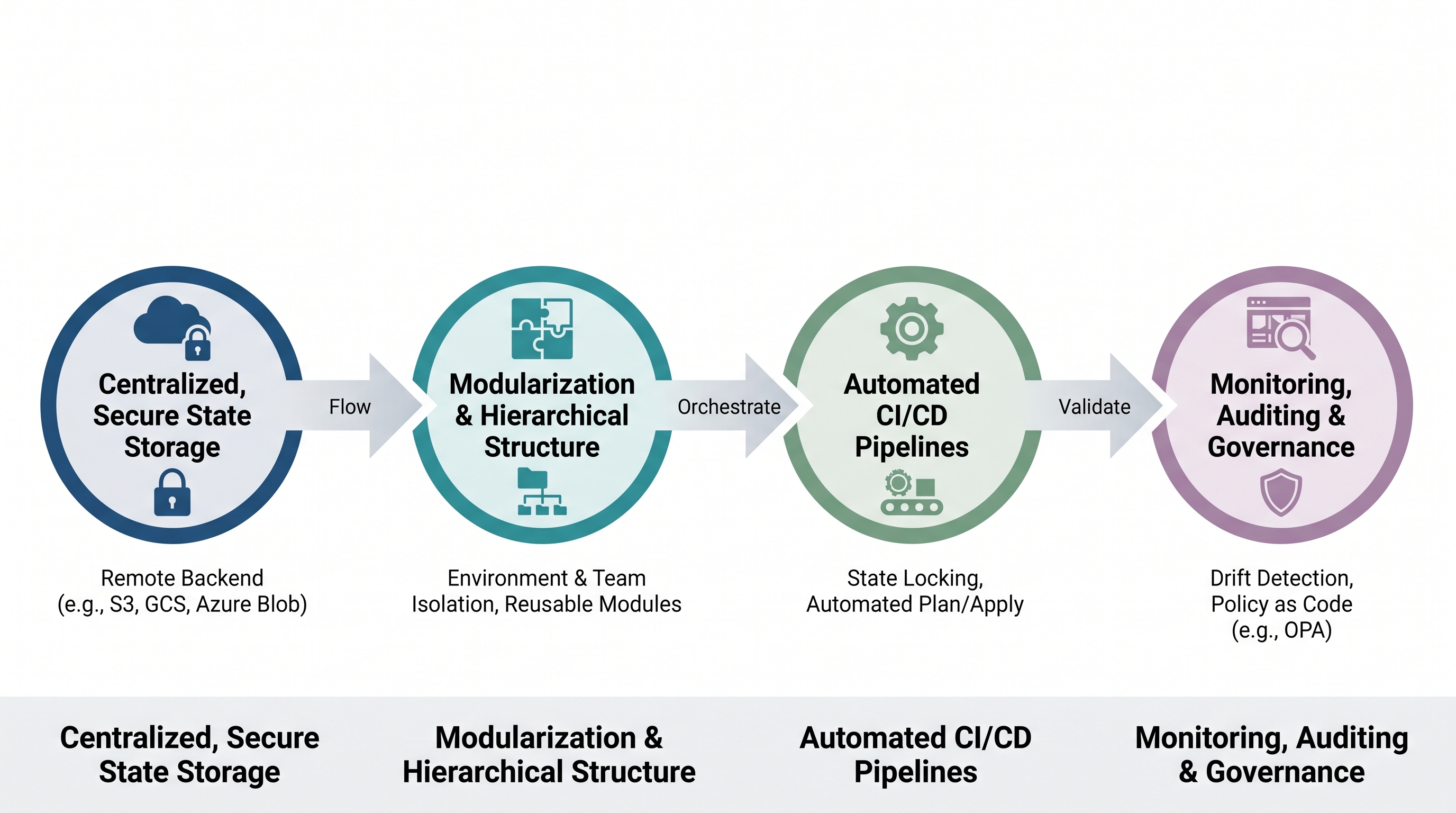
The Architecture of Scale: Why 10,000+ State Files Exist
As enterprises scale their cloud footprints across AWS, Azure, GCP, and Oracle Cloud, monolithic Infrastructure as Code (IaC) deployments inevitably break down. In the early stages of cloud adoption, a single, massive Terraform state file representing an entire environment (e.g., prod-infrastructure.tfstate) is common. However, as the organization grows to hundreds of developers, multiple business units, and thousands of microservices, this monolithic approach presents severe operational hazards.
First, the blast radius of a single state file becomes unacceptably large. A minor syntax error, an interrupted execution, or an accidental deletion of a single resource can corrupt the entire state file, bringing down mission-critical production systems. Second, resource execution times scale linearly with the number of managed resources. A terraform plan or terraform apply on a monolith containing thousands of resources can take over an hour, as Terraform must query the cloud provider’s APIs for every single resource to construct the current state representation.
To mitigate these risks, modern enterprise platforms adopt a micro-state architecture. By decoupling infrastructure into small, isolated, and logically bounded state files (e.g., splitting by region, environment, business unit, and layer—such as networking, IAM, databases, and application runtimes), the blast radius is minimized, and execution times are reduced to seconds. This architectural shift is a vital requirement for modern infrastructure and SRE teams managing complex, heterogeneous environments. However, fracturing your infrastructure into 10,000+ state files introduces a new set of challenges: state file organization, remote state access latency, lock contention, dependency management, and governance overhead.
State File Organization and Directory Layouts
When managing 10,000+ state files, manual configuration of backend blocks is impossible to maintain. You must establish a highly structured, predictable directory layout coupled with dynamic backend configurations. The industry standard is to use a hierarchical directory structure that mirrors your cloud organization structure, combined with tools like Terragrunt or native Terraform stacks to generate backend configurations programmatically.
Consider the following enterprise directory structure optimized for multi-cloud, multi-region deployments:
root/
├── aws/
│   ├── org-root/
│   │   ├── global/
│   │   │   └── iam/
│   │   │       └── terragrunt.hcl
│   │   └── us-east-1/
│   │       ├── prod/
│   │       │   ├── vpc/
│   │       │   │   └── terragrunt.hcl
│   │       │   ├── rds/
│   │       │   │   └── terragrunt.hcl
│   │       │   └── eks/
│   │       │       └── terragrunt.hcl
│   │       └── dev/
│   │           └── vpc/
│   │               └── terragrunt.hcl
└── azure/
    └── tenant-root/
        └── eastus/
            └── prod/
                └── vnet/
                    └── terragrunt.hcl
In this architecture, every leaf directory contains a single, isolated state file. To prevent developers from hardcoding backend configurations, use a parent configuration file (such as a root terragrunt.hcl) that dynamically interpolates the file path to generate the S3, GCS, or Azure Blob Storage backend key. For example, a root configuration can dynamically generate the S3 backend key based on the directory path:
# root terragrunt.hcl
remote_state {
  backend = "s3"
  config = {
    bucket         = "enterprise-terraform-state-${get_aws_account_id()}"
    key            = "${path_relative_to_include()}/terraform.tfstate"
    region         = "us-east-1"
    encrypt        = true
    dynamodb_table = "terraform-locks"
  }
}
This dynamic generation ensures that developers never copy-paste backend configurations, eliminating the risk of two separate workspaces overwriting the same state file. It also enforces a strict naming convention that aligns with your resource taxonomy, facilitating automated discovery and policy enforcement.
Mitigating Lock Contention and State Locking at Scale
State locking is critical to prevent concurrent executions from writing to the same state file simultaneously, which causes catastrophic state corruption. At a scale of 10,000+ state files, traditional locking mechanisms can experience severe performance degradation and lock contention, especially in automated CI/CD pipelines where hundreds of plans and applies run concurrently.
When using AWS S3 as a backend, DynamoDB is used for state locking. Each lock writes an item to a DynamoDB table with a primary key of LockID. At scale, you must optimize this lock table to handle burst traffic. If your CI/CD platform triggers 500 parallel pipelines during a deployment window, you may hit DynamoDB write limit throttling. To resolve this, configure your DynamoDB state lock table with On-Demand capacity mode rather than Provisioned mode, ensuring the table scales instantly to handle high concurrency peaks without failing executions.
Furthermore, lock contention often occurs when pipelines unnecessarily lock state files during read-only operations. By default, terraform plan acquires a write lock on the state file. In high-concurrency environments, this can block other developers or pipelines from running plans. To optimize this workflow, instruct your CI/CD pipelines to run plans with the lock disabled or with a strict, non-blocking timeout:
# Execute plans with a non-blocking lock timeout
terraform plan -lock-timeout=15s
If a lock cannot be acquired within 15 seconds, the pipeline fails gracefully instead of hanging indefinitely, freeing up runner resources. For read-only environments or automated policy checks, you can safely bypass locking entirely using terraform plan -lock=false, though this must be done with caution to ensure no concurrent writes are occurring.
Security and Compliance: Protecting Secrets in 10,000+ States
Terraform state files are highly sensitive; they contain a complete map of your infrastructure, metadata, and often, plaintext secrets. If a database is provisioned using Terraform, the auto-generated master password, private keys, and API tokens are written directly to the .tfstate file in plaintext. This makes state files a prime target for malicious actors.
To secure a massive fleet of state files, you must implement a multi-layered security strategy that can be integrated into your broader security management workflows. This involves strict access control, encryption, and proactive secret avoidance.
1. Encryption at Rest with Customer-Managed Keys (CMK)
Do not rely on default cloud provider encryption. For S3, GCS, or Azure Blob backends, enforce the use of Customer-Managed Keys via KMS or Key Vault. Ensure that key rotation is enabled and that access to the KMS key is decoupled from access to the storage bucket. A user may have read access to the S3 bucket, but without the corresponding KMS decrypt permission, they cannot read the state file contents.
2. Fine-Grained IAM Policies and ABAC
Implement Attribute-Based Access Control (ABAC) or strict path-based IAM policies. Developers should only have access to the state files representing the environments they own. For example, a developer in the "Payment Gateway" team should only have IAM permissions to read/write to the S3 path s3://enterprise-state/payments/*. Below is an example of an AWS IAM policy enforcing path-based access control:
{
    "Version": "2012-10-17",
    "Statement": [
        {
            "Effect": "Allow",
            "Action": [
                "s3:GetObject",
                "s3:PutObject"
            ],
            "Resource": "arn:aws:s3:::enterprise-state-bucket/teams/payments/*"
        },
        {
            "Effect": "Deny",
            "Action": [
                "s3:GetObject",
                "s3:PutObject"
            ],
            "Resource": "arn:aws:s3:::enterprise-state-bucket/teams/hr/*"
        }
    ]
}
To maintain operational integrity across these thousands of isolated workspaces, organizations must enforce strict policy guardrails to prevent unauthorized modifications to critical resources, ensuring that security policies are applied universally without manual intervention.
3. Secret Management Integration
The best way to protect secrets in state files is to prevent them from entering the state file in the first place. Instead of passing sensitive variables directly into Terraform resources, utilize dynamic data sources or integration with secret managers at runtime. For instance, rather than generating a database password in Terraform, provision the database with a temporary password and use an external tool to rotate it, or fetch the password dynamically from AWS Secrets Manager or HashiCorp Vault during the application bootstrap phase.
FinOps and Operational Overhead of Mass State Files
Managing 10,000+ state files introduces unexpected financial and operational overhead. Every time a terraform plan or apply runs, Terraform makes hundreds of API calls to the cloud provider to verify the status of resources. At scale, this leads to two major issues: API rate limiting and cloud provider costs.
API Rate Limiting (Throttling)
Cloud providers enforce strict rate limits on their control plane APIs (e.g., AWS EC2, Azure Resource Manager, GCP Cloud APIs). When executing hundreds of parallel Terraform runs, your CI/CD pipelines will frequently hit these limits, resulting in RequestLimitExceeded or 429 Too Many Requests errors. This halts deployments and can cause pipeline failures across the entire organization.
To avoid throttling, implement the following strategies:
Decouple State Dependencies: Avoid using
terraform_remote_statedata sources extensively. When state A reads from state B viaterraform_remote_state, Terraform must fetch and parse the entire state file of B. If 100 states depend on state B, state B's backend bucket and APIs will be hammered. Instead, publish shared outputs to a fast, low-cost key-value store like AWS SSM Parameter Store, Azure App Configuration, or Consul, and read from those stores using lightweight data sources.Increase Cache Durations: When running automated checks or drift detection, configure your tooling to use cached state representations where possible, rather than querying the live cloud APIs on every execution.
Implement Exponential Backoff: Configure your Terraform AWS or Azure providers with custom retry counts and backoff parameters to gracefully handle rate limiting:
# AWS Provider configuration with custom retry logic
provider "aws" {
  region     = "us-east-1"
  max_retries = 10
}
FinOps Optimization and Cost Impact
While the storage cost of 10,000 state files in S3 or GCS is negligible, the operational costs associated with API requests, KMS key invocations, and DynamoDB lock queries can scale rapidly. Furthermore, untagged or orphaned resources provisioned across thousands of state files can lead to massive cost leaks. This aligns perfectly with enterprise CIO FinOps initiatives looking to control runaway cloud spend.
To optimize costs, organizations must ensure that every resource provisioned via Terraform is properly tagged with metadata (e.g., owner, cost center, environment). Implementing automated tagging policies directly within your Terraform modules ensures that billing data can be accurately mapped back to the specific state file and team responsible for the resource. This granular visibility is crucial for identifying idle or underutilized resources across thousands of isolated states.
CI/CD Orchestration and Pipeline Design for 10k States
At a scale of 10,000+ state files, running sequential CI/CD pipelines is a bottleneck that halts developer velocity. If a developer submits a pull request that modifies a shared networking module, you cannot afford to run 10,000 pipelines sequentially to determine which environments are affected. You need a highly parallelized, graph-aware CI/CD orchestration engine.
1. Git-Based Change Detection
Your CI/CD pipeline must be intelligent enough to execute plans only in directories that contain modified files. By analyzing the Git diff of a pull request, the pipeline runner can map modified files to their specific Terraform workspaces. For example, if a change is made in aws/us-east-1/prod/rds/variables.tf, the pipeline should only trigger a terraform plan within that specific directory.
2. Dependency Graph Resolution
When changes are made to shared infrastructure modules, multiple state files may need to be updated in a specific order. To handle this, utilize orchestration tools that can parse dependency graphs (e.g., Terragrunt’s run-all command or custom DAG engines like Temporal or Argo Workflows). The orchestrator builds a Directed Acyclic Graph (DAG) of your workspaces and executes them in parallel, respecting dependency boundaries. For example, the VPC workspace must complete its apply before the EKS workspace begins its plan.
Below is a conceptual visualization of a parallelized DAG execution pipeline for a multi-tier application deployment:
         [ VPC Workspace (Apply) ]
          /                     \
         v                       v
[ RDS Workspace (Apply) ]   [ EKS Workspace (Apply) ]
         \                       /
          v                     v
       [ Kubernetes Application Deployments ]
3. Ephemeral Runner Scaling
To execute hundreds of concurrent Terraform runs without queue delays, deploy self-hosted CI/CD runners on elastic compute platforms such as Kubernetes (using Actions Runner Controller - ARC) or AWS ECS with Fargate. These runners should spin up dynamically in response to webhook events, execute the Terraform command, and immediately terminate. This ensures you only pay for compute during execution windows and eliminates runner resource starvation.
Automated Governance and Drift Detection with CloudAtler
When managing over 10,000 state files, manual review of drift, security compliance, and cost impacts is impossible. Infrastructure drift—where a resource is modified directly via the cloud console or CLI, bypassing Terraform—is the leading cause of failed Terraform runs and security vulnerabilities. To maintain operational stability, enterprises require automated, continuous governance.
This is where CloudAtler provides unparalleled value. By integrating directly with your multi-cloud environments and IaC repositories, CloudAtler acts as a force multiplier for your platform engineering teams. All information is consolidated into a single, unified dashboard for complete visibility into your cloud operations, security posture, and infrastructure state health.
CloudAtler continuously monitors your cloud resources against your Terraform state files, leveraging Atler AI to automatically detect out-of-band changes, evaluate their security risks, and calculate the cost impact of the drift. Instead of waiting for a developer to run a pipeline, CloudAtler identifies drift in real-time and provides automated remediation paths, ensuring your physical cloud infrastructure remains perfectly aligned with your declared code.
Operational Vector | Traditional IaC Approach | Enterprise Scale with CloudAtler |
|---|---|---|
Drift Detection | Manual | Continuous, agentless background scanning with zero rate-limit impact. |
Secrets Management | Plaintext secrets stored in S3/GCS buckets; risk of exposure via loose IAM policies. | Automated state scrubbing and integration with enterprise KMS/Secret vaults. |
FinOps Tracking | Manual tagging policies; untracked costs across thousands of isolated workspaces. | Automated tag enforcement, predictive cost impact modeling, and waste detection. |
Pipeline Orchestration | Sequential execution or basic script-based parallelism; high lock contention. | Graph-aware concurrent execution with dynamic lock queue management. |
Conclusion: Unify Your Cloud Operations
Scaling Infrastructure as Code to 10,000+ state files is not merely a challenge of writing better Terraform modules; it is an organizational, architectural, and operational hurdle. By decoupling monolithic states into micro-states, establishing a dynamic directory taxonomy, optimizing locking mechanisms, and implementing robust CI/CD orchestration, you can maintain high developer velocity while minimizing the blast radius of infrastructure changes.
However, managing this scale manually is a recipe for operational fatigue, security vulnerabilities, and runaway cloud costs. Enterprises need an intelligent, automated platform to bridge the gap between Infrastructure as Code, Security, and FinOps.
Ready to take control of your multi-cloud infrastructure? Unify your cloud operations, automate drift detection, secure your environments, and optimize your cloud spend with CloudAtler. Explore the CloudAtler Platform today or schedule a personalized demo with our cloud architecture experts.
All in One Place
Atler Pilot decodes your cloud spend story by bringing monitoring, automation, and intelligent insights together for faster and better cloud operations.