
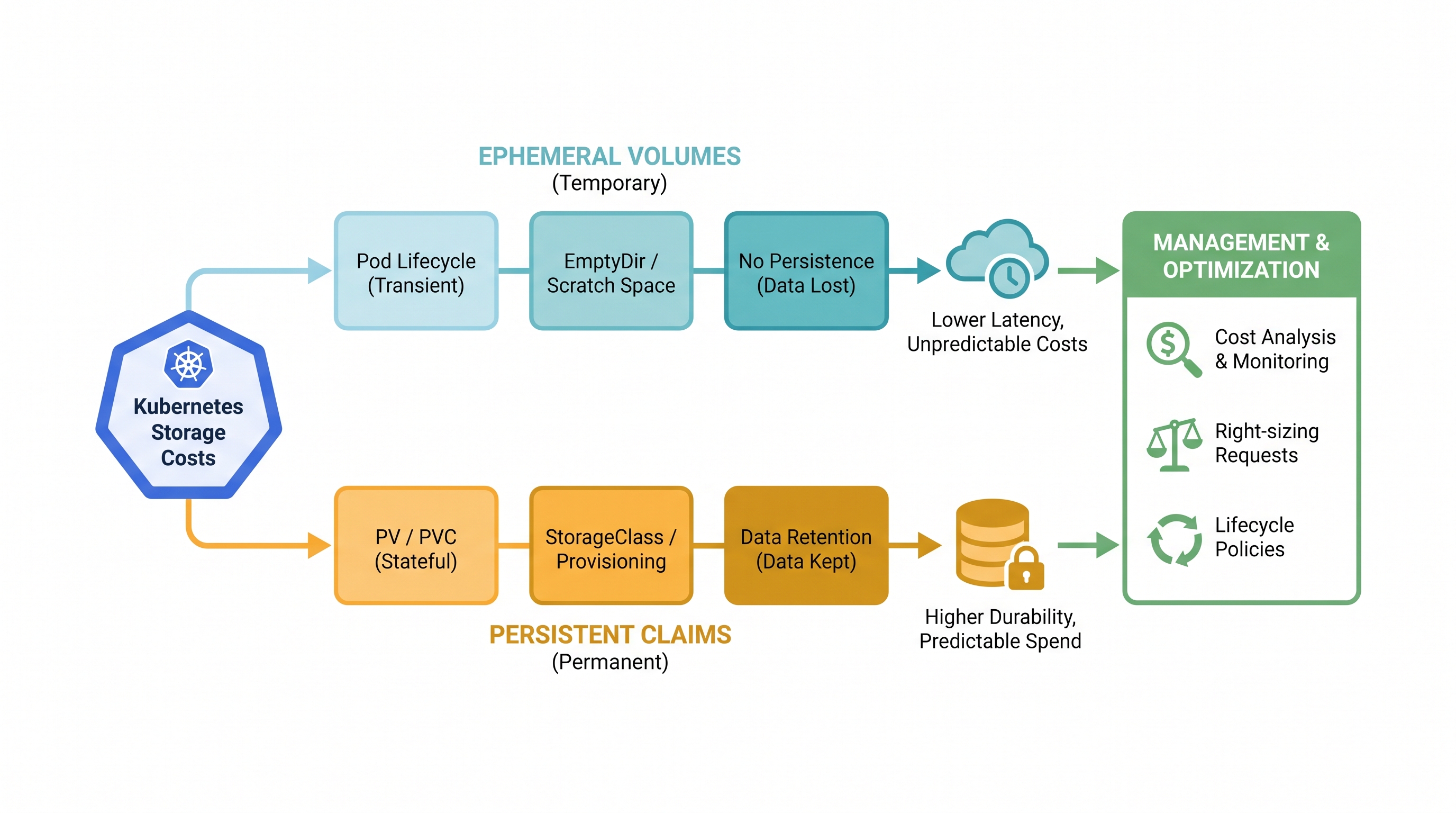
The Hidden Dimensions of Kubernetes Storage Costs
As enterprises scale their Kubernetes footprints, cloud cost optimization efforts naturally gravitate toward compute resources. Platform teams spend weeks tuning horizontal pod autoscalers, configuring spot instances, and purchasing savings plans. However, storage costs are frequently treated as a secondary concern—an overlooked line item on the monthly cloud bill that quietly compounds over time.
Unlike compute instances, which can be easily spun down or scaled to zero during off-peak hours, storage is stateful and persistent. Once allocated, storage assets incur continuous, round-the-clock costs regardless of whether the applications write a single byte of data. In Kubernetes, this problem is compounded by abstraction. The declarative nature of Kubernetes allows developers to provision cloud storage dynamically using a simple PersistentVolumeClaim (PVC) or by utilizing local ephemeral storage. While this abstraction accelerates development, it decouples the provisioner from the financial consequences of their architectural decisions.
To build a truly cost-optimized cloud infrastructure, infrastructure and SRE teams must demystify how Kubernetes handles storage. This requires analyzing two primary storage paradigms: ephemeral storage (the temporary workspace of your containers) and persistent storage (the long-term, disk-backed storage that survives pod lifecycles). Managing these effectively requires a unified financial operations platform that bridges the gap between raw Kubernetes manifests and cloud billing APIs.
1. Ephemeral Storage Deep Dive: Root Disks, emptyDir, and the Silent Cost of Node Bloat
Ephemeral storage in Kubernetes is the local storage space available on a node that pods use for temporary data, caching, logs, and runtime scratch space. This storage is tied directly to the lifecycle of the pod; when the pod is deleted or evicted, its ephemeral storage is purged. However, "ephemeral" does not mean "free."
How Ephemeral Storage Works Under the Hood
Every Kubernetes node is provisioned with a root disk (typically an AWS EBS volume, GCP Persistent Disk, or Azure Managed Disk). This root disk hosts the operating system, the container runtime (such as containerd), the kubelet's internal state, container log files, and emptyDir volumes. When a pod writes to its container filesystem (outside of a mounted persistent volume) or writes to an emptyDir volume, it consumes space on the node's root disk.
There are two primary ways ephemeral storage is allocated:
Writable Layers: When a container runs, any changes to its root filesystem are written to a copy-on-write (CoW) layer. If an application writes large temporary files directly to its local directory structure, it consumes space on the node's root disk.
emptyDir Volumes: An
emptyDirvolume is created when a Pod is assigned to a Node, and exists as long as that Pod is running on that node. By default,emptyDirvolumes are stored on the node's primary storage medium (e.g., SSD or HDD), though they can be configured to use RAM (tmpfs) by settingemptyDir.medium: Memory.
The Financial and Operational Risks of Unconstrained Ephemeral Storage
Without explicit boundaries, a single misconfigured pod can write hundreds of gigabytes of logs or temporary files to its local disk. This triggers several cascading issues:
Node Disk Pressure Evictions: When the node's root disk utilization exceeds the eviction threshold (typically 85% to 90%), the kubelet begins evicting pods to reclaim disk space. This leads to application instability, service disruptions, and increased engineering overhead.
Overprovisioned Root Disks: To mitigate disk pressure evictions, platform teams often resort to overprovisioning the root disks of their worker node pools. For example, instead of running nodes with a cost-effective 50 GB root disk, they might provision 300 GB disks across hundreds of nodes. This dramatically inflates the baseline compute cost of the cluster, as you are paying premium block storage rates (e.g., AWS gp3 rates) for unused safety margins.
OOM Kills via Memory-Backed emptyDir: When developers use
emptyDir.medium: Memoryto speed up application performance, they are consuming the node's system memory (RAM). If this is not constrained, it can trigger the Linux Out-Of-Memory (OOM) killer, terminating critical application processes.
Implementing Ephemeral Storage Requests and Limits
To control costs and protect node stability, you must enforce ephemeral storage resource requests and limits at the pod level. This allows the Kubernetes scheduler to place pods on nodes that have sufficient disk capacity and enables the kubelet to evict specific pods that exceed their allocated disk budget, rather than destabilizing the entire node.
Here is an enterprise-grade YAML manifest demonstrating how to apply these limits:
apiVersion: apps/v1
kind: Deployment
metadata:
  name: batch-processing-worker
  namespace: production
  labels:
    app: batch-processor
spec:
  replicas: 3
  selector:
    matchLabels:
      app: batch-processor
  template:
    metadata:
      labels:
        app: batch-processor
    spec:
      containers:
      - name: processor
        image: internal-registry.corp/processing/worker:v2.1.0
        resources:
          requests:
            cpu: "1"
            memory: "2Gi"
            ephemeral-storage: "5Gi"
          limits:
            cpu: "2"
            memory: "4Gi"
            ephemeral-storage: "10Gi"
        volumeMounts:
        - name: scratch-space
          mountPath: /tmp/scratch
      volumes:
      - name: scratch-space
        emptyDir:
          sizeLimit: "10Gi"
In this configuration, the scheduler ensures that the pod is only placed on a node with at least 5Gi of available ephemeral storage. If the container's writable layer and the scratch-space volume combined exceed 10Gi, the kubelet will evict the pod, preventing it from consuming the entire node's root disk. This allows platform engineers to safely size worker node root disks based on predictable, bounded workloads, resulting in significant structural savings.
2. Persistent Volumes (PVs) and Claims (PVCs): Structural Drivers of Cloud Bill Overruns
While ephemeral storage costs are often hidden within compute node pricing, Persistent Volumes (PVs) represent direct, explicit storage spend. In Kubernetes, stateful workloads use PersistentVolumeClaims (PVCs) to request physical storage from the underlying cloud provider. This request is fulfilled by a StorageClass, which maps to specific cloud storage offerings like AWS EBS, Azure Disk, or Google Cloud Persistent Disk.
Dynamic Provisioning and the "Reclaim Policy" Trap
Dynamic provisioning simplifies storage management by automatically creating physical cloud storage when a developer creates a PVC. However, the lifecycle of these volumes is governed by the reclaimPolicy defined in the StorageClass. There are two primary reclaim policies:
Delete: When the PVC is deleted, the underlying PV and the physical cloud storage resource are automatically deleted.
Retain: When the PVC is deleted, the underlying PV is preserved, and the physical cloud asset remains active. The volume enters a "Released" state, meaning it cannot be bound to another PVC without manual intervention, but it continues to accrue charges on your cloud bill.
In enterprise environments, security policies often mandate the Retain policy to prevent accidental data loss. While safe, this policy creates a massive inventory of "orphaned" volumes. When deployments or statefulsets are torn down during CI/CD runs, testing phases, or application migrations, the PVCs are deleted, but the underlying EBS or Azure disks remain active in the cloud account. These zombie volumes can sit idle for months, quietly draining your budget.
The Performance Dimension: IOPS, Throughput, and Overprovisioning
Cloud providers do not charge for storage capacity alone; they also charge for performance characteristics such as Input/Output Operations Per Second (IOPS) and throughput. In legacy cloud storage models (such as AWS gp2), IOPS performance was tied directly to capacity. To get 3,000 IOPS, you had to provision a 1,000 GB volume, even if your application only required 50 GB of space.
Modern storage classes (like AWS gp3, Azure Ultra Disk, and GCP Extreme PD) decouple performance from capacity, allowing you to provision and pay for IOPS and throughput independently. However, this flexibility introduces a new risk: overprovisioning. Developers, fearing performance bottlenecks, often request excessive IOPS and throughput levels that their applications never actually utilize.
Consider the following comparison of AWS gp3 volumes:
Volume Configuration | Monthly Capacity Cost ($0.08/GB) | Monthly IOPS Cost (3k free, $0.005/addl) | Monthly Throughput Cost (125MB/s free, $0.04/addl) | Total Monthly Cost |
|---|---|---|---|---|
Standard: 100 GB, 3,000 IOPS, 125 MB/s | $8.00 | $0.00 | $0.00 | $8.00 |
Overprovisioned: 100 GB, 12,000 IOPS, 500 MB/s | $8.00 | $45.00 | $15.00 | $68.00 |
By overprovisioning IOPS and throughput, the cost of a single 100 GB volume increases by 750%. Multiply this across hundreds of pods in an enterprise cluster, and the financial impact becomes staggering. Utilizing a precise cost impact calculation is critical to identifying these discrepancies before they manifest on your cloud invoice.
Cross-AZ Data Transfer Costs
Another major driver of hidden storage costs is cross-Availability Zone (cross-AZ) data transfer. When a stateful pod is scheduled in Zone A (e.g., us-east-1a) but needs to replicate data to a standby pod or write to a storage asset located in Zone B (e.g., us-east-1b), cloud providers charge data egress fees (typically $0.01 per GB in both directions). If your database workloads are highly active, cross-AZ replication costs can quickly surpass the raw cost of the storage volumes themselves.
3. Architecting Cost-Optimized Kubernetes Storage
To systematically eliminate storage waste and build cost-efficient Kubernetes architectures, platform engineers must implement structural changes to how storage is provisioned, scaled, and managed.
Leveraging CSI Volume Expansion
Historically, resizing a database volume meant scheduling downtime, copying data to a larger drive, and updating mount points. With the modern Container Storage Interface (CSI), Kubernetes supports online volume expansion. This allows you to start with small, highly conservative volume sizes and expand them dynamically as they fill up, completely eliminating the need to provision "buffer" space for multi-year growth.
To enable this, your StorageClass must explicitly set allowVolumeExpansion: true:
apiVersion: storage.k8s.io/v1
kind: StorageClass
metadata:
  name: gp3-expandable
provisioner: ebs.csi.aws.com
volumeBindingMode: WaitForFirstConsumer
allowVolumeExpansion: true
parameters:
  type: gp3
  iops: "3000"
  throughput: "125"
With this configuration, when an application's disk usage nears capacity, a platform engineer or automated operator can simply edit the PVC manifest and increase the spec.resources.requests.storage value. The CSI driver handles the underlying cloud volume expansion and file system resize on the fly, with zero application downtime.
Optimizing Storage Classes for Different Workloads
A common anti-pattern is using a single, high-performance StorageClass for all workloads in a cluster. Instead, design tier-based storage classes that map to the specific performance and cost profiles of your workloads:
Tier 1 (High Performance Databases): Use premium SSDs (e.g., AWS gp3 with custom IOPS, Azure Ultra Disk) with
volumeBindingMode: WaitForFirstConsumer. This mode ensures that the volume is provisioned in the exact Availability Zone where the pod is scheduled, minimizing cross-AZ latency and data transfer costs.Tier 2 (General Purpose): Use standard SSDs (e.g., gp3 with baseline 3000 IOPS / 125 MB/s) with
reclaimPolicy: Deletefor development and non-production environments to prevent orphaned disk accumulation.Tier 3 (Cold/Backup Storage): Use throughput-optimized HDDs (e.g., AWS st1) or object storage integrations for heavy read/write batch processing workloads that do not require low latency.
Utilizing Local NVMe SSDs with Node Taints
For workloads requiring extreme performance with temporary lifecycles (such as distributed caching nodes, machine learning training sets, or search engine indexing), network-attached block storage can be both slow and prohibitively expensive. In these scenarios, utilizing instance-store local NVMe SSDs is highly cost-effective.
Local NVMe drives are physically attached to the host server, offering near-zero latency and massive throughput at no additional cost beyond the baseline instance price. To use them safely in Kubernetes, you should define a LocalPersistentVolume and apply appropriate node taints and tolerations to ensure only specific, fault-tolerant workloads are scheduled on these ephemeral-heavy nodes.
4. The Intersection of Security, Compliance, and FinOps in Kubernetes Storage
Storage management is not solely a financial concern; it is deeply intertwined with cloud security and compliance. When optimizing storage costs, platform teams must ensure they do not compromise the organization's security posture or violate regulatory frameworks like GDPR, HIPAA, or PCI-DSS.
The Cost of Encryption-at-Rest
Enforcing encryption-at-rest is a standard security requirement. In cloud environments, this is typically handled by integrating your storage classes with Key Management Services (KMS) such as AWS KMS, Azure Key Vault, or GCP Cloud KMS. While the storage class configuration itself is straightforward, the financial impact lies in KMS API call charges.
Every time a pod attaches a volume, reads/writes data (in certain configurations), or scales up, API calls are made to the KMS to decrypt volume keys. For highly dynamic clusters with thousands of short-lived pods, KMS API transaction costs can escalate rapidly. To optimize this, ensure that your CSI drivers are configured to cache volume encryption keys securely at the node level, reducing the frequency of external KMS API calls without compromising data security.
Secure Data Destruction vs. Retain Policies
As discussed earlier, the Retain reclaim policy is often used to prevent accidental data loss. However, keeping abandoned volumes indefinitely poses a significant security risk. These inactive disks contain sensitive enterprise data, yet they often fall outside the scope of active patch management, vulnerability scanning, and access control updates.
From a compliance perspective, keeping data longer than necessary violates the principle of data minimization. Therefore, a secure, cost-optimized storage architecture must implement automated lifecycle policies. If a volume has been in an "Available" (unattached) state for more than 14 days, it should be automatically backed up to a low-cost, encrypted object storage tier (like AWS S3 Glacier), and the original block storage volume should be securely deleted. This dual-action approach dramatically reduces active storage spend while maintaining a robust, audit-ready compliance posture.
Implementing these continuous compliance checks requires a robust security management framework that continuously scans your infrastructure for unattached, unencrypted, or non-compliant storage assets.
5. Practical Blueprint: Automating Kubernetes Storage Optimization
Manually auditing Kubernetes storage across multi-cloud environments is unsustainable at enterprise scale. To achieve continuous optimization, platform teams must automate the detection of storage inefficiencies and establish clear operational guardrails.
Step 1: Detecting Orphaned PVCs and Volumes
The first step in any FinOps storage campaign is identifying orphaned resources. You can write custom scripts using kubectl and cloud CLI tools to find volumes that are no longer bound to active pods. For example, the following command lists all PVCs in a cluster that are in a Lost or Pending state, which often indicates configuration errors or abandoned resources:
kubectl get pvc --all-namespaces | grep -E 'Lost|Pending'To identify orphaned cloud volumes on the AWS side (volumes that still exist but are not attached to any EC2 instance/Kubernetes node), you can query the AWS EC2 API:
aws ec2 describe-volumes --filters Name=status,Values=available --query "Volumes[*].{ID:VolumeId,Size:Size,AZ:AvailabilityZone}" --output tableWhile these manual commands are helpful for ad-hoc audits, they do not scale across multi-region, multi-cloud deployments. Real-time observability requires automated systems that continuously track these metrics and issue immediate budget control alerts when anomalies or orphaned resources are detected.
Step 2: Right-Sizing Active Volumes
To identify overprovisioned volumes, you must analyze actual disk utilization inside the containers. The Prometheus operator and Kube-State-Metrics collect detailed storage metrics from the kubelet. The key metrics to monitor are:
kubelet_volume_stats_used_bytes: The amount of storage space currently used by the volume.kubelet_volume_stats_capacity_bytes: The total provisioned capacity of the volume.
By calculating the ratio of these two metrics, you can identify volumes that are running at low utilization (e.g., less than 20% capacity used). These are prime candidates for down-sizing or consolidation during the next maintenance window.
Architectural Warning on Down-Sizing Volumes
While the CSI driver allows you to easily expand volumes, cloud providers do not support shrinking block storage volumes. To reduce the size of a persistent volume, you must provision a new, smaller PVC, synchronize the data from the old volume to the new volume (using tools like rsync or database replication tools), update your application manifests, and then delete the old, oversized volume.
Step 3: Continuous Governance and Automation
To prevent storage drift from reoccurring, integrate storage cost policies directly into your CI/CD pipelines and Kubernetes admission controllers. Using tools like Open Policy Agent (OPA) or Kyverno, you can enforce policies such as:
Restricting the maximum size of a PVC that a developer can request in non-production namespaces (e.g., max 50 GB).
Mandating that all
StorageClassesuse thegp3provisioner instead of the legacy, more expensivegp2.Enforcing tagging structures on PVCs to ensure every storage volume is mapped to a specific cost center.
Unifying Your Kubernetes Operations with CloudAtler
Managing the delicate balance between Kubernetes storage performance, security, and cost is a complex, continuous challenge. Siloed tools and manual scripts only provide fragmented views, leaving platform teams blind to the true cost drivers of their stateful applications.
CloudAtler provides a unified, AI-powered platform that bridges these operational silos. By combining advanced FinOps cost calculations, deep security compliance scanning, and automated Kubernetes operations, CloudAtler empowers enterprise teams to optimize their cloud footprints across AWS, Azure, GCP, and Oracle Cloud environments from a single pane of glass.
With CloudAtler, you can automatically detect orphaned persistent volumes, identify overprovisioned IOPS, enforce storage governance policies, and secure your data assets—all while cutting your cloud storage bill by up to 40%. Stop guessing your storage needs and start automating your optimization journey today.
Ready to take control of your cloud costs? Explore the CloudAtler Platform or schedule a personalized demo with our cloud architecture experts today.
All in One Place
Atler Pilot decodes your cloud spend story by bringing monitoring, automation, and intelligent insights together for faster and better cloud operations.